Prefer To Watch This Review Instead?
This is my review on the Roland FP-40 digital piano, which is the long awaited upgrade to the SUPER popular Roland FP-30X; probably one of Roland’s best selling digital pianos ever. So what’s new and what’s NOT? Let’s check it out!
Roland’s FP Lineup
The Roland FP series (their portable line of digital pianos) is currently composed of 5 models:


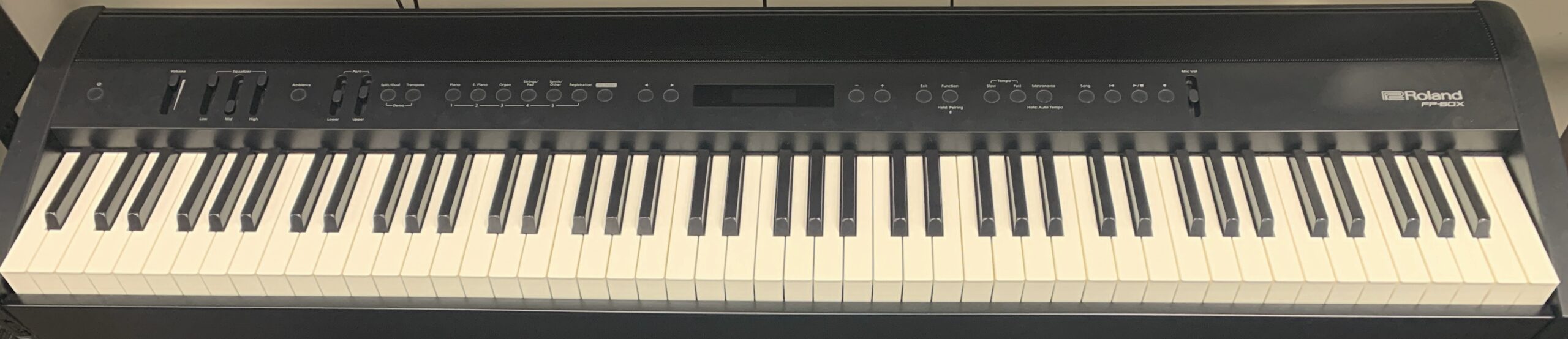
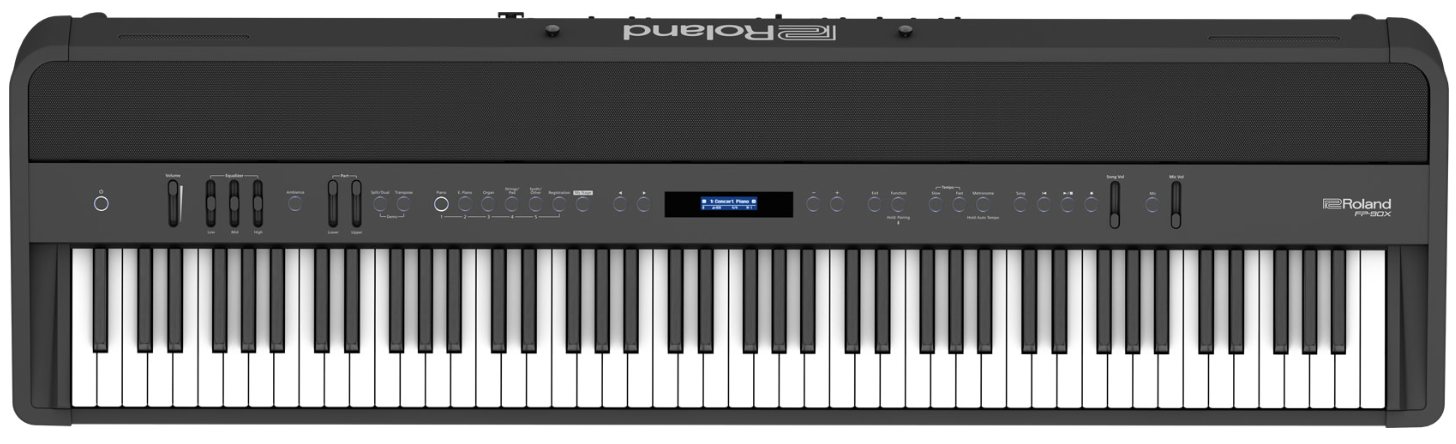
Roland has always put the emphasis in this lineup on realistic key action and high quality piano sounds; it really is a “Piano Player’s” piano. The first 4 models share the same highly regarded triple sensor PHA4 key action, with only the MUCH higher priced FP-90X having an even higher quality action. And in the first 2 (and understandably most popular due to price) models, this emphasis is VERY apparent, because the FP-10, FP-30X and now the FP-40 have VERY minimalist user interfaces which require memorizing function key combinations to change sounds and adjust various settings. The FP-E50 actually sits a bit on its own in this lineup, because it actually has arranger features built in with rhythms and accompaniment.
Key Action
As I mentioned, the FP-40 is equipped with the super popular PHA4 triple sensor, fully weighted & graded hammer action (with escapement). This action is praised my MANY people in the digital piano community as being one of the best entry level key actions, because compared to competitors in the same price range, it is considered to be very close to the feel of an acoustic piano. But as I’ve always said in my reviews, key action is TOTALLY personal, and what feels good to one player may feel not so good to the next, and vice versa. Personally, I have never been a big fan of the PHA4 action – I find it to be a bit heavy and sluggish feeling when compared to lighter and faster responding key actions from Yamaha or Casio. But again . . . key action is totally personal; I have always preferred lighter actions, and the only time I ever play on an acoustic piano is if I come across one at a friend’s house or a train station – I will NEVER own or regularly play on an acoustic piano, so having a digital piano that mimics an acoustic piano’s key action . . . isn’t something that matters to me. BUT . . . if having a digital piano with a key action that DOES feel close to an acoustic piano matters to YOU? Then any of the keyboards in Roland’s FP lineup (including the FP-40) will most likely be something that you will REALLY like.
Most of the competing actions (at least in the FP-10 and FP-40’s price range) will only have dual sensors, and won’t have escapement. The extra sensor in the PHA4 action should give you a more accurate response to your level of dynamics. And what is “escapement”? Escapement is a “notch-like” sensation that’s intended to mimic the feel on a real piano of “let-off” which is when the hammer is released just before striking the string so that it doesn’t muffle the string’s vibration. Given that I never play acoustic pianos, this isn’t something I’m expecting (or even familiar with), but if I press a key on the FP-40 VERY slowly I can easily feel this . . . “notch” sensation. But to be honest, I’m not accomplished enough of a player to notice whether it’s there or not when I play naturally.
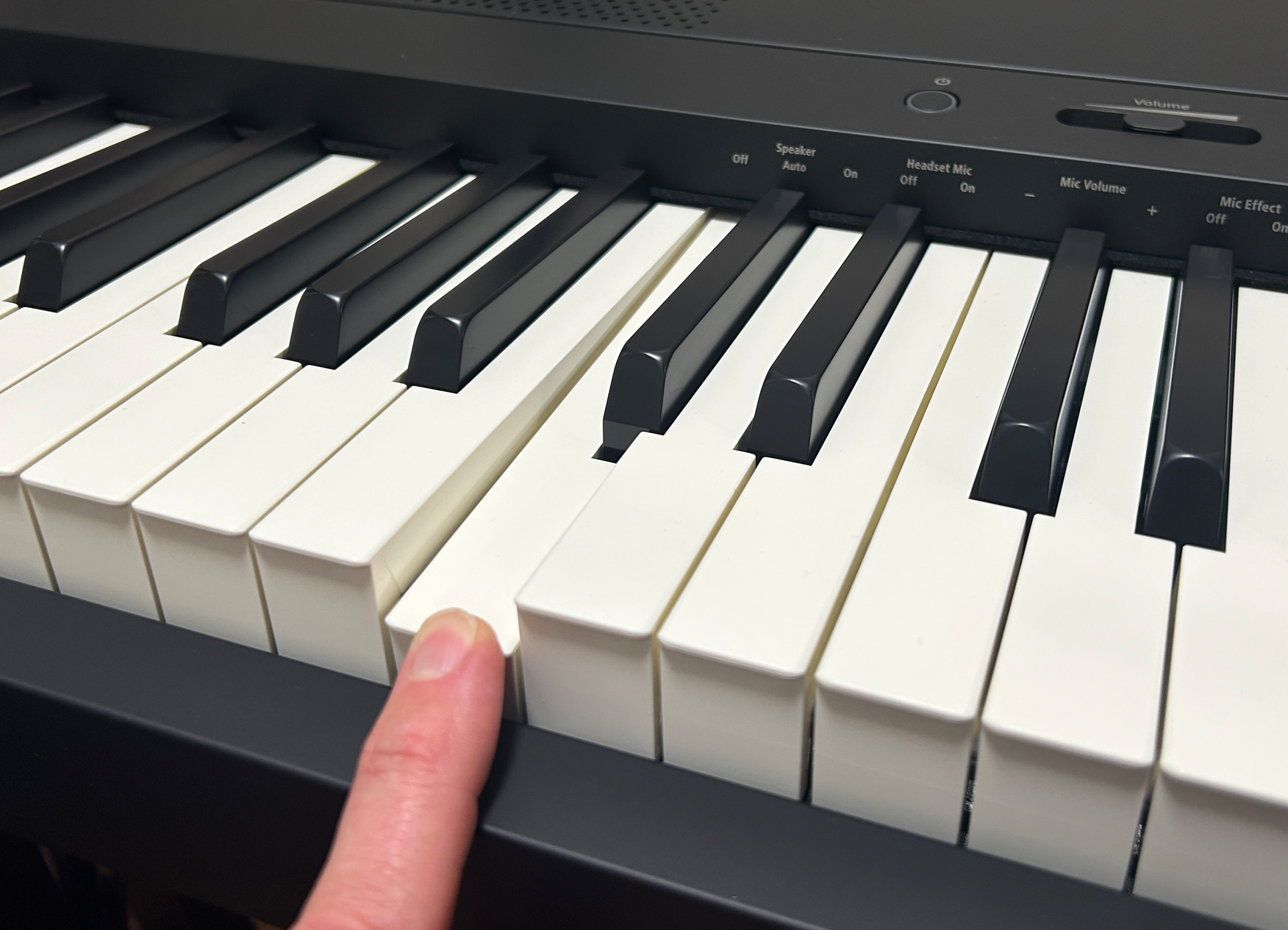
Something else important to note about the PHA4 action is its pivot length. Manufacturers never seem to publish this data, but the pivot length on the FP-40 definitely feels to be longer than the main competitors key actions. A longer pivot length makes it MUCH easier to play up “into the keys” (so closer to the back of the keys); I can immediately notice this on the FP-40 – it’s BARELY any heavier as I play further up.
Something else I wanted to talk about; even though I happen to find it this action a bit heavy, I DO find it to be REALLY easy to control my dynamics on the FP-40. As it turns out, Roland has apparently modified and enhanced how the PHA4 action interacts with the upgraded sound engine, and has adjusted the touch curve, and those things can affect the playing experience. I will talk about this again when I talk about voices, but you can REALLY hear the piano samples change (I’m assuming due to the modeling) with even REALLY tiny changes in dynamics which is super cool. So whether I’m liking the PHA4 action a TINY BIT more on the FP-40 BECAUSE of these changes, or . . . NOT, and I’m just imagining things (which is also VERY possible lol) I’m really not sure, but I did think it was worth mentioning.
And the last thing to mention is that the white keys are lightly textured which does give you a nicer feel than the smooth & shiny white keys you’ll find on something like the Yamaha P-225.
So the verdict on the key action? As with the other models in the FP line that also have the PHA4 action? Even though I’m not a huge fan, if having a keybed that feels as close as possible to an actual piano is important to you? You will most likely love the action on the FP-40.
User Interface
When I heard about the release of the FP-40, the FIRST thing that I thought was “I REALLY hope they fixed the user interface from the one on the FP-30X . . . “; so did they? Unfortunately . . . NO; they did make SOME improvements, but the core issue that has always made me dislike this interface is still an issue with the FP-40. And what is that issue? The fact that you have to memorize (or lookup) and use function key combinations not only to adjust even BASIC settings, but you even need to use key combinations to select sounds, which I have always found super frustrating on ANY piano that uses this approach. Now that’s NOT just an issue with Roland, that list includes the FP-10, FP-40 and the Casio PX-S1100 & PX-S5000, the Kawai ES60 and the Yamaha P-145. And, you cannot glance at the front panel and KNOW what your current settings are or even know for sure what your current voice is! Now to be fair, because I play in bands, I tend to look at a keyboard’s user interface from the perspective of “can I use this keyboard to play gigs with my band?”; the answer to that for the FP-40 (at least for me) is . . . “absolutely NOT”, since I use TONS of different sounds and setups). But, if I was still playing with a blues band where I only needed a couple of sounds (like the main piano, main electric piano and main organ) where it’s not overcomplicated to memorize and choose just a couple sounds quickly at a gig, then I could probably get away with it.
And, there IS the Roland Piano companion app that allows you to choose sounds with a visual interface using an iPad, which (if you’re using it at home) would alleviate this issue significantly. As far as using an app like that on stage, I personally wouldn’t depend on it – I’ve had apps from both Roland and Casio behave pretty erratically at random times (even when I first tried connecting my FP-40, I got an error and was told it wasn’t connected even though it actually was). So for stage use? Not for me; although I AM using the app for this review, so that I don’t have to worry about looking up key combinations. 🙂
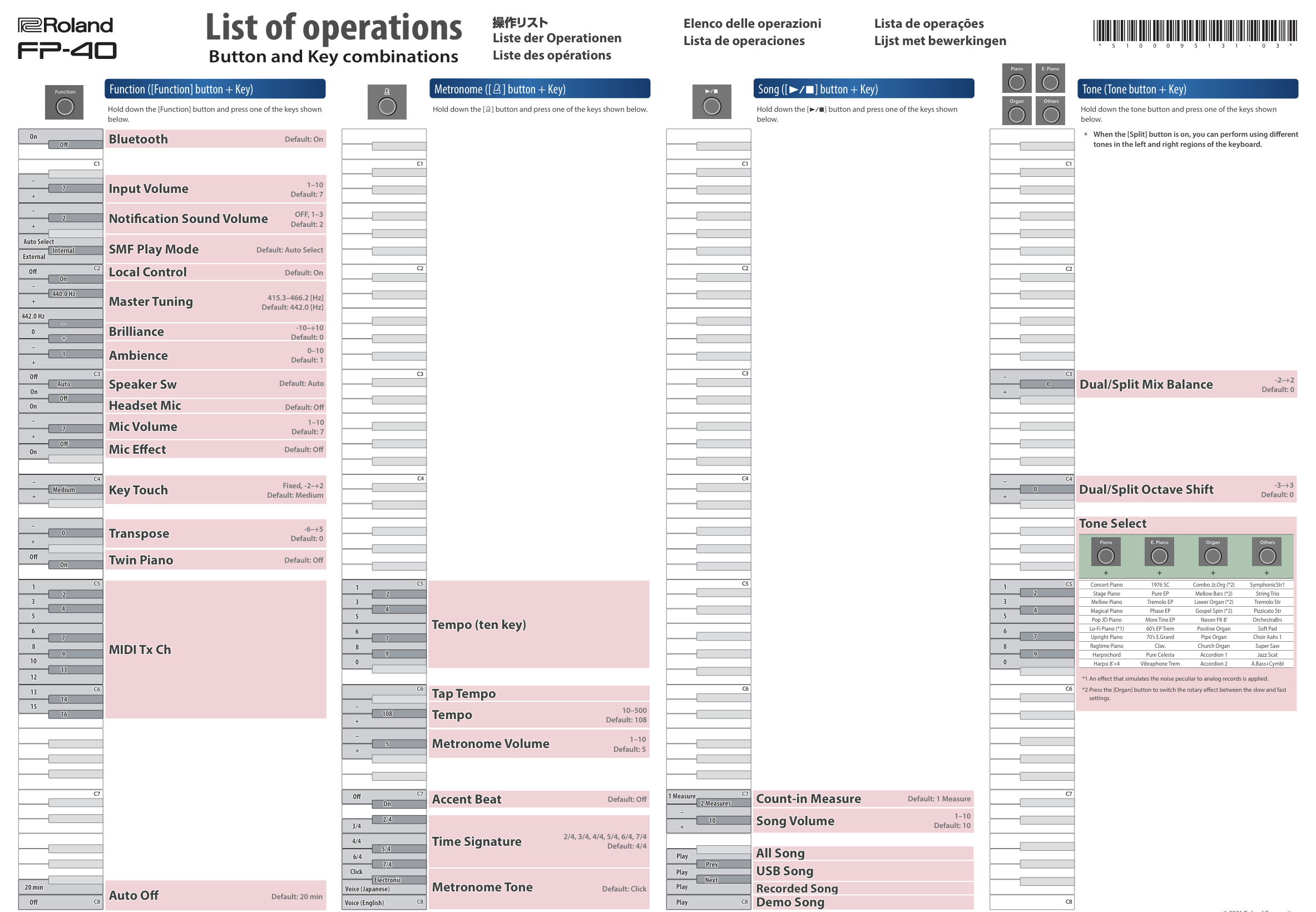
On the other hand, if you only intend to be using your new FP-40 at home? Then while the user interface might be a bit annoying in this regard, it’s not the end of the world since you’re not needing to edit sounds or settings super quickly (although for home use I WOULD HIGHLY recommend using the app instead). If you don’t intend on using the app, you might want to download and print out (maybe on a nice heavy stock) the one page function key map: (you can also download this as a PDF from Roland’s website); maybe even print out the tone selection list on a separate page so it’s nice and big.
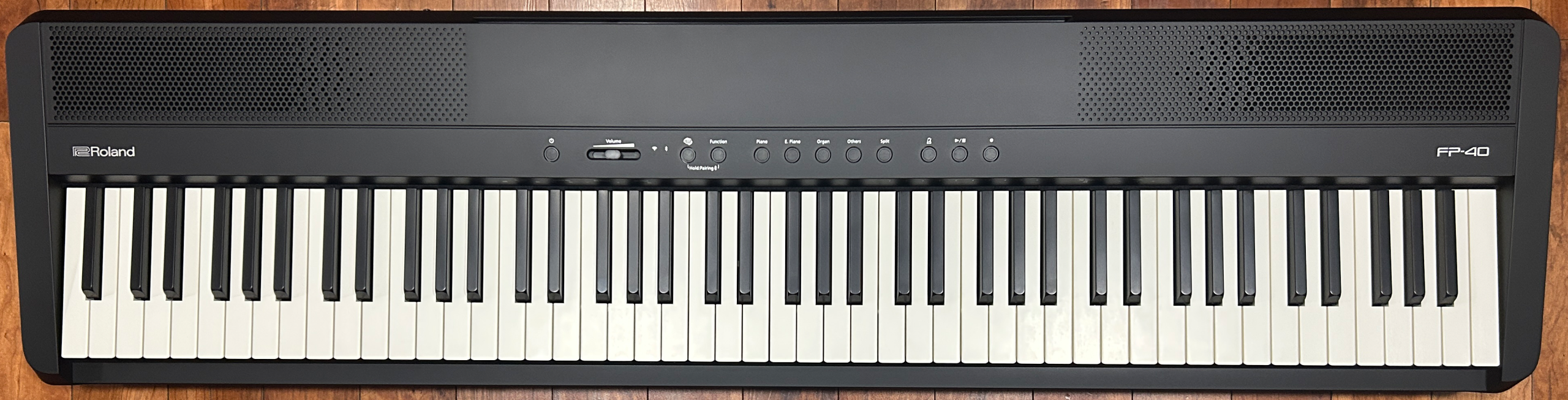
So what are the SMALL improvements that Roland made? They moved the controls from the left side to the centre, which is a welcome change. They replaced the SUPER annoying up and down volume buttons with a slider, which makes it FAR easier to control your volume. They added one additional voice category to the buttons; the FP-30X only had Piano, Electric Piano & Other, the FP-40 now has an Organ category as well, which makes it a BIT easier to find tones (more on that in a second). And the final small improvement is they replaced the skinny plastic buttons with the round button style found on the FP-60X & FP-90X; not really a big functional difference by any stretch, but they do feel much nicer under the fingers.
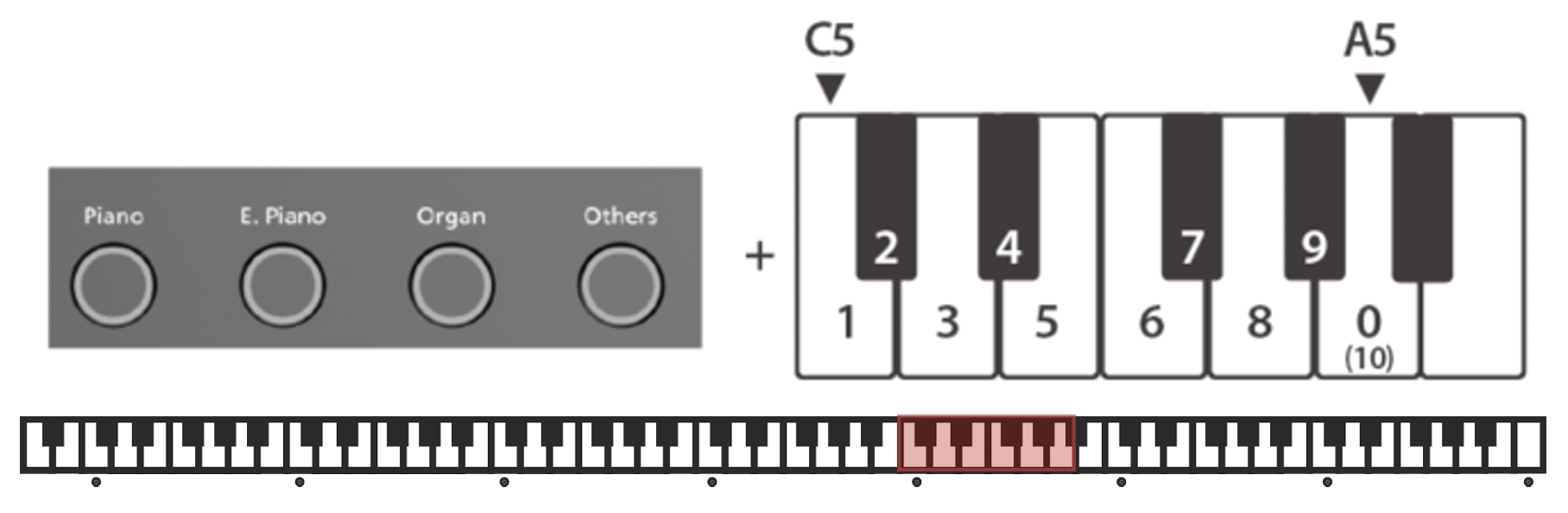
Now while you do still need to memorize the keys for selecting voices, it IS a LITTLE bit easier on the FP-40 than on the FP-30X. The reason for that is instead of having a different number of tones within each of the tone categories (which means you’d be using a different range of piano keys for each category), the FP-40 has 10 tones in EACH of the 4 categories. Because of that, the SAME TEN keys can be used for each category, and those keys are labelled from 1 to 0 (10). You do still need to know what # = what tone, but at least you’re always using the same keys (from C5 to A5):

On the left we have a power button, and that nice new volume slider. Then there are status lights for the new onboard WIFI and BlueTooth. Then we have the Function button which you’ll be using a LOT in conjunction with keys on the piano to edit settings, then the 4 tone category buttons.

Then we have the Split button; to select your left hand tone, you hold down split & the tone category, then use the appropriate piano key (from C5 to A5) to choose your tone. Doing this will set your current left hand tone, then you can choose your right hand tone normally, and use the split button to turn splits on and off as you like. For layering tones, you select the tone you want from each category FIRST (to establish them as the currently selected tone IN those categories) then to actually layer (which Roland calls “Dual”) you press each category button simultaneously. So not only is that . . . pretty convoluted (and kind of annoying), it also means you can only layer voices from 2 different categories (you can’t for example, layer 2 electric pianos together). Note that you CAN layer 2 voices from the same category together IF you use the Roland Piano app. Then to the right of that we have the metronome button & buttons for working with onboard recordings or built in songs.
And in addition to the key labels for tone selection & controlling the metronome, there are also key labels for turning speakers on or off, the headset mic and effects on or off and for adjusting the relative mic volume. To be honest, alot of these pianos that require key combinations could really improve the user experience SIGNIFICANTLY by adding as many labels as possible! In my opinion, making using the instrument easier is MUCH more important than worrying about “how busy those labels look”.

So my overall thoughts on the user interface on the Roland FP-40? Even with some VERY minor improvements, I’m still going to be pretty critical of this interface; I can’t believe manufacturers are STILL releasing products that require function key combinations. It would make a MASSIVE difference if Roland added even a simple two line screen showing your currently selected main voice on the top line, with the second line showing a secondary voice with an indication of whether you’re in split or layered mode – and if you could toggle back and forth between those 2 lines and use buttons or a knob to scroll through the tone list, that would alleviate 90% of my frustration with this interface. But to be fair, as I said at the start of this section, if you’re just using the piano at home, then the user interface isn’t AS big of an issue, and you can make your experience working with the FP-40 easier using the app. But as far as performing goes, I would NOT recommend the FP-40 unless you only need to use a VERY small handful of voices, and you don’t need to use any splits or layers.
BUT . . . if YOUR main use case is just going to be “turn on your keyboard and play piano?” then the user interface isn’t THAT big of a deal.
Voices
The FP-40 has 40 onboard voices, and an additional 265 voices available within one of the Roland apps. This is actually down from the 56 onboard voices available on the FP-30X. I do like the fact that Roland added the Organ category (instead of including the organs in the Electric Piano group), and I also like how each category has 10 options; as I mentioned in the User Interface overview, it does make it a LITTLE bit easier to select them. Pianos & harpsichords have gone from 12 to 10 tones, electric pianos & organs still have 20 tones, and the “Other” category has gone from 24 to 10 tones. The guitar tones are gone, but most of the other types are still there, just with fewer options.
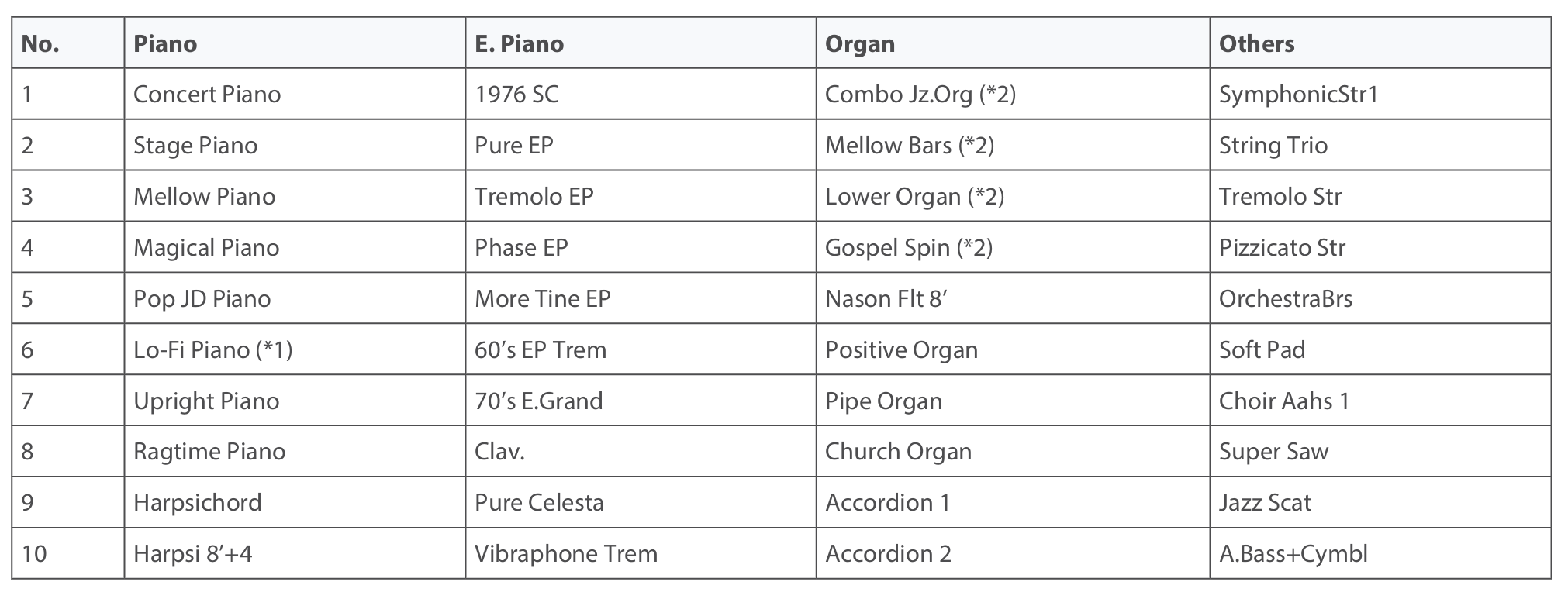
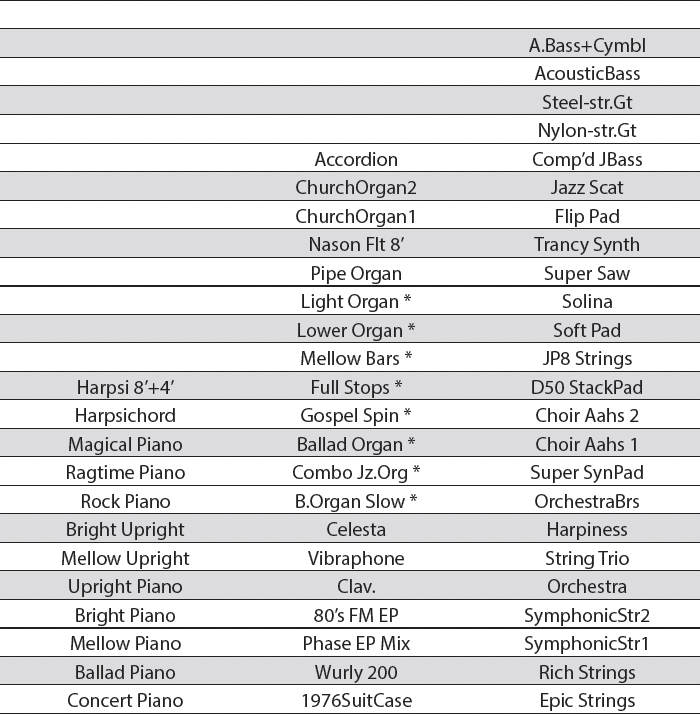
The FP-40 still has 256 notes of polyphony, but the official name of the sound engine has been changed from the “Supernatural Sound Engine” to “Piano Reality Technology”. Both of these sound engines use a combination of samples and modeling (which adjusts your sound on the fly based on how you play), but this apparently isn’t JUST a name change. According to Roland, there are new and upgraded samples included on some of the tones, and the modeling has been improved, with some of the technology used on Roland’s premium LX and GP lines trickling down to the FP-40.
So how do these voices sound? Here’s a quick demo of some of the main voices on the FP-40; and I’ll include some split and layered demos as well.
So what did you think of the tones on the FP-40? The Concert and Stage pianos are definitely my favorites; they’re both FANTASTIC pianos, and they have SOOO much dynamic detail in them thanks to the new samples and modeling that’s going on as you play. I actually like the Stage one the best because it’s a bit brighter than the Concert one (so . . . a BIT more like a Yamaha piano which have always been my favorites). When I first selected piano voice #6 I thought something was wrong with the FP-40 because of the crackling and noise I could hear . . . until I looked up what that voice was and saw it was a Lo-Fi piano (which is supposed to include some crackling and noise for that “old fashioned” effect).
For electric pianos, there are some nice ones included here; my favorites would be the 1976 Suitcase and the 60’s Tremolo EP. I’m not a specialist in identifying a Rhodes vs a Wurlitzer, but I THINK most of these are based on Rhodes (I’m not sure I recognize a definite Wurly in this list, but I could be wrong.
The organ tones are . . . OK; they’re what you would expect from a keyboard like the FP-40 that focuses on PIANO, but Roland has added a feature here that is REALLY cool and definitely helps make these pre-sampled organ voices MUCH more usable. The first 4 organ voices not only have a rotary speaker effect baked in, BUT you can flip the rotary speaker speed back and forth from slow to fast by pressing the organ button! I have to send a huge shoutout to Roland for including that.
In the “Other” category, it’s nice to see a “Bass & Cymbal” (as opposed to just a bass) option, and I also found the strings to be surprisingly good overall. For synth, there’s only one synth tone . . . “Super Saw”, but it’s a very good generic “all-purpose” synth that will get the job done in most cases.
So how are these sounds compared to the FP-30X? As I mentioned earlier, I DO HOPE to get the chance to do a side by side shootout video, which is the only way I’ll know for sure; I’m willing to BET that in headphones the main pianos PROBABLY sound a bit better, but in a live situation out of a PA system? I probably wouldn’t be able to hear a difference in that situation.
Effects
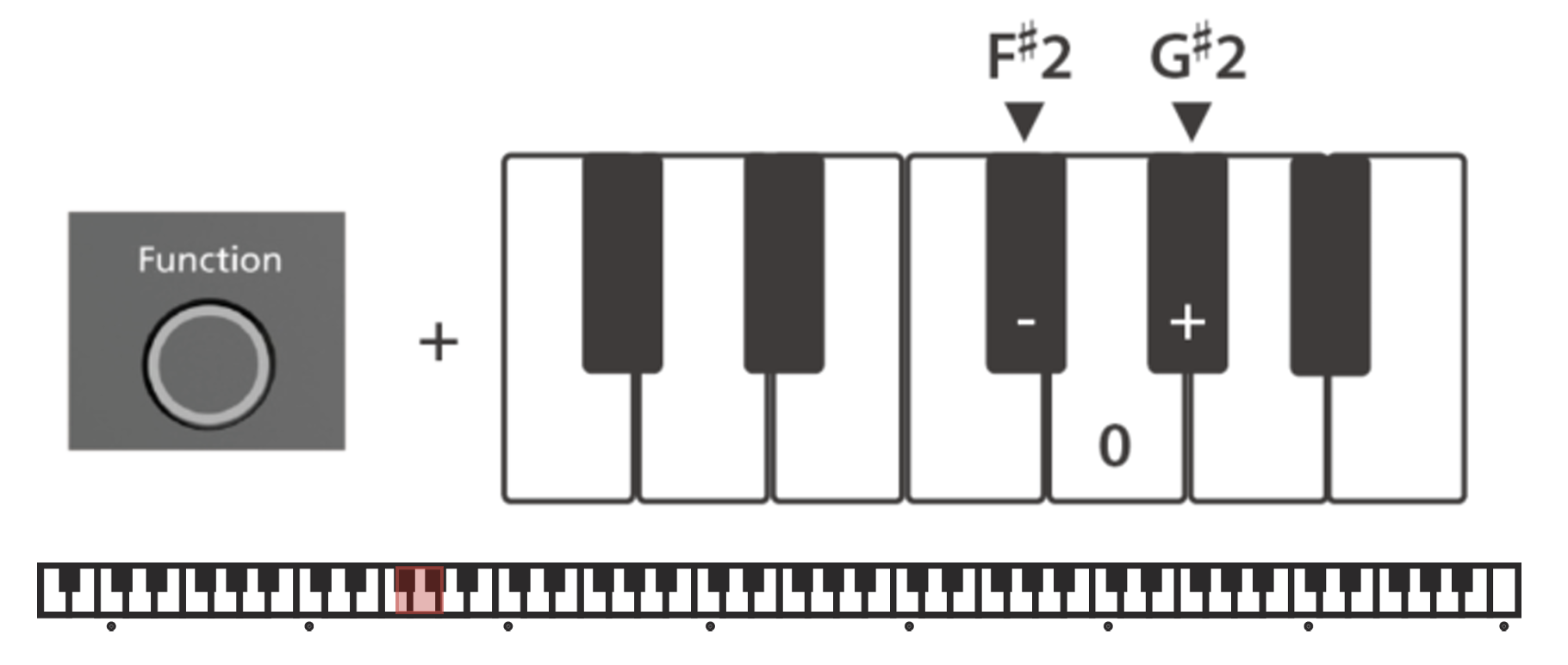
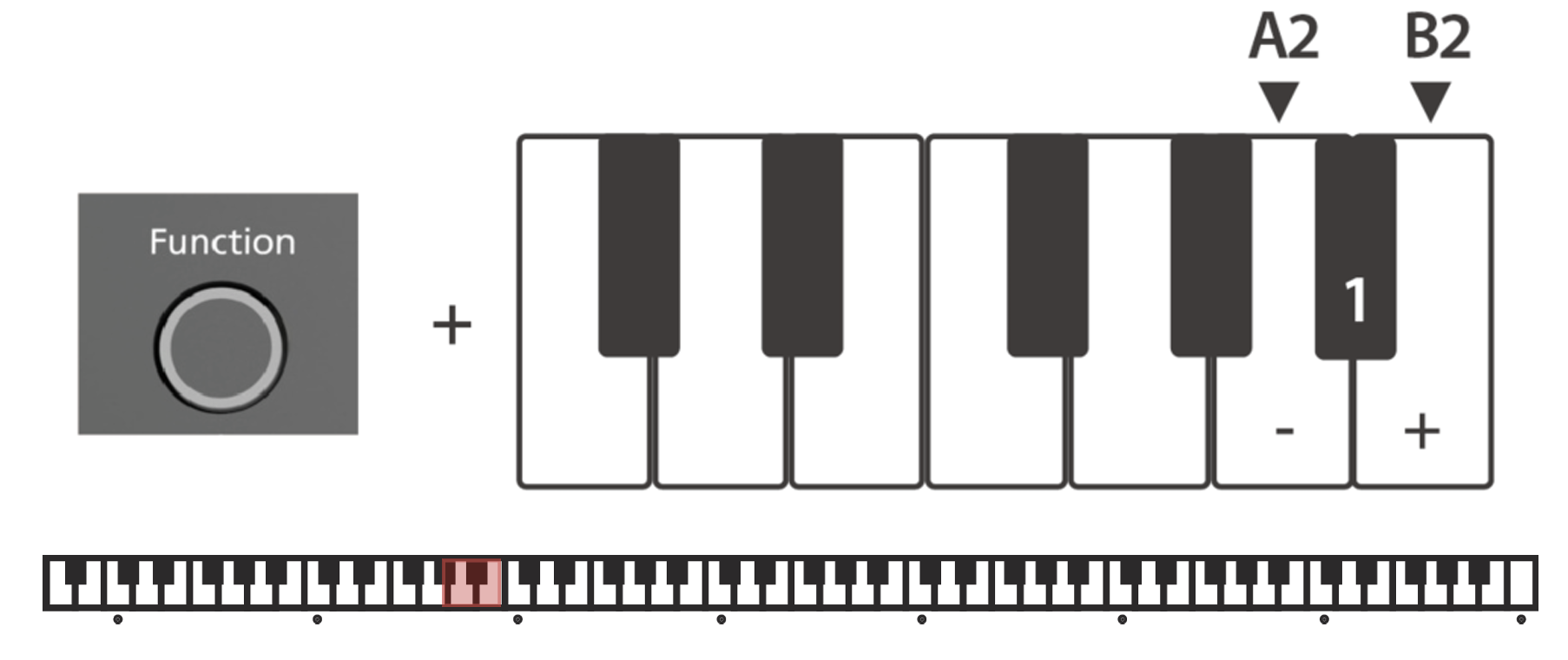
For effects, the FP-40 has 11 levels of ambience (which is reverb), and 21 levels of brilliance (which is chorus). As with most settings, you have to memorize and use function key combinations to adjust these settings; you hold down the Function key and use piano keys to increment or decrement the effects levels, and you can also press a certain key to reset the effect level to default.
Something else that’s important to note with regard to effects (especially since I’m a big Hammond organ fan) is that SOME of the organ voices (the first 4 in the organ section; the ones with an * by their name in the tone list) have a rotary speaker effect included, and you can toggle the speed back and forth between slow and fast by pressing the Organ voice category button. I think this was also a feature in the FP-30X that I think I completely overlooked; but this is actually a real nice touch from Roland to have included that.
Piano Designer Features
With regard to effects, it’s definitely worth mentioning that you can deep dive into fine tuning your piano sounds by using Roland’s “Piano Designer” settings; do note that these settings only apply to the main first 3 piano tones: the Concert, Stage & Mellow pianos. Also, note that you USED to need a standalone app called “Piano Designer” to adjust these settings, but all of that functionality has now been rolled into the main Roland Piano app which is REALLY nice to see.
With Piano Designer, you can adjust settings for things like:
- Lid position
- String resonance
- Damper resonance
- Key off resonance
- Cabinet resonance
- Temperament
- Temperament key
And you can even adjust some settings on a note by note basis:
- Single note tuning
- Single note volume
- Single note character
I don’t have time in this review to deep dive into these settings (nor is it something I would ever bother with myself), but if you are into fine tuning your sounds like this, then you’ll definitely want to look into the Piano Designer settings.
Recording
The FP-40 has a simple onboard MIDI recorder – you can hit the record button, and record your playing, and play it back and play along with it, etc. This is handy & useful for quickly capturing an idea, but for actual music production, it’s not very useful. To do that properly, you’ll want to connect your piano to a device running some DAW software like Garageband on an iPad. If you like, you can move your recordings to a USB flash drive, but once again if it’s anything more than just quickly capturing an idea? Use a proper DAW app on a device instead.
As far as audio recording goes, there is no onboard audio recording functionality, but since the FP-40 has an audio interface built into the USB port, you can easily record audio DIRECTLY to an app on a device with just a USB cable, which is an awesome feature. This also allows you to easily make a performance video with high quality audio by simply connecting the piano to your phone and using your phone’s built in camera app to record a video (the app will use the direct audio coming through the USB connection INSTEAD of its built in mic.
Registration Memory (No, but . . . )
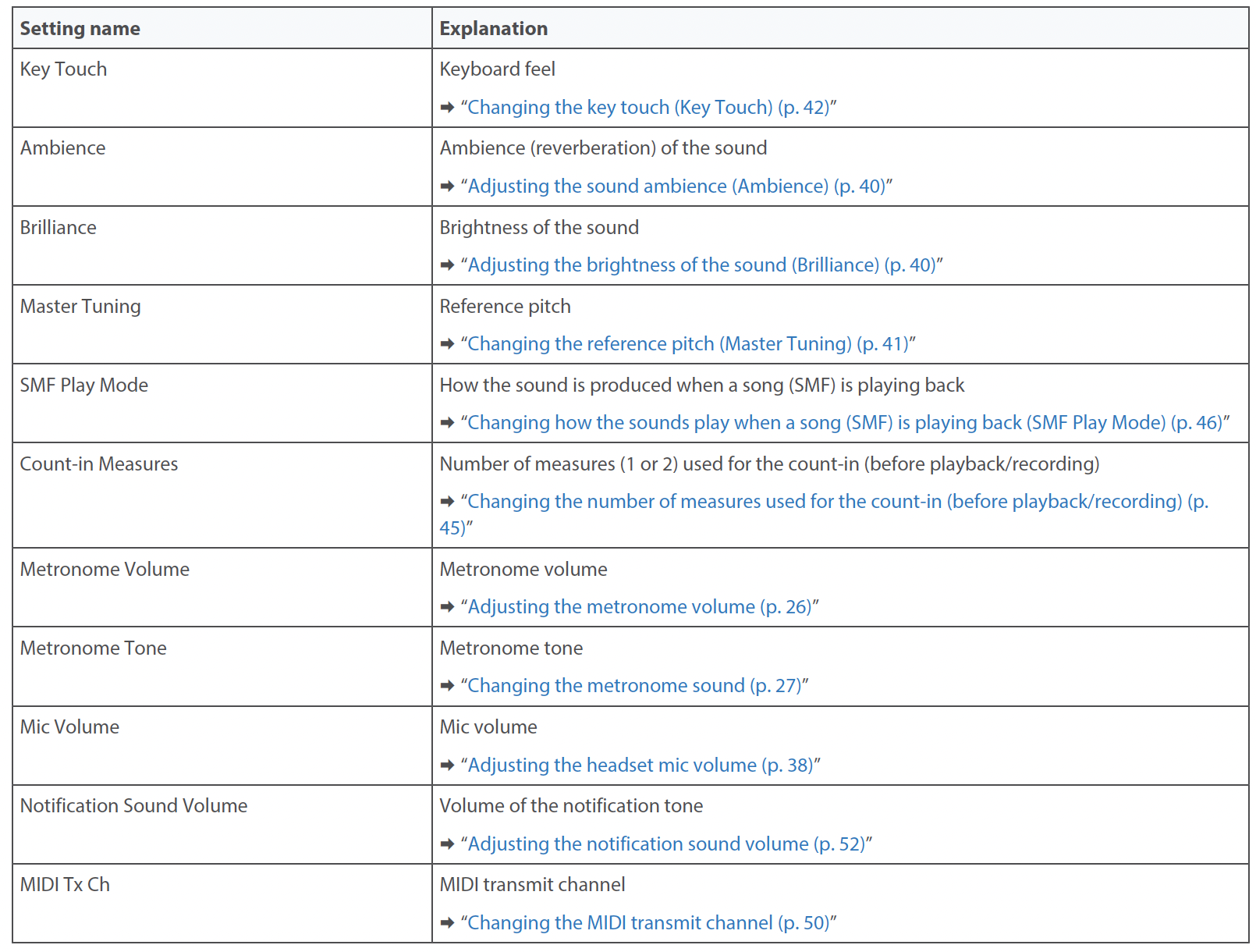
Just like the FP-30X, the FP-40 does NOT give you the ability to save your custom setups as a registration; given that the user interface is so minimal, this is really a shame. However, with the “Memory Backup” feature, you do have the ability to save some SETTINGS as defaults so they’re at least all set where you want them to be when you turn the piano on; this isn’t really a registration (but it is a nice feature to have). You can check the manual for the key combinations for doing this, but here are the settings that get saved with this procedure:
Connectivity
For connectivity, the Roland FP-40 is pretty well equipped, and has some unique stuff going on.
- instead of 2 headphone ports on the front like the FP-30X had, there is now only one 1/8″ port; but the interesting new feature here is that you can use headphones that include a mic, so you can talk (and or sing with optional mic reverb) and have that audio included in the signal going out through the speakers, USB and line out ports which is pretty cool. I don’t own a set of studio headphones that include a proper mic so I can’t test that here, but it is a cool feature. Although I have to say, most studio headphones by default use the much sturdier 1/4″ connection, so I’m a bit let down that that port is now gone, but . . . not the end of the world.

On the back of the FP-40 we have:
- USB to host port, which not only transmits MIDI, but also audio in BOTH directions (thanks to the built in USB audio interface) which is an awesome feature; and Roland has upgraded this port to USB-C which is a nice touch. And another cool thing about this port is that it will supply power to compatible USB-C devices, which is also super cool
- USB flash drive port which you can move your onboard recordings to, or playback audio files from
- 1/4″ L&R line out ports for proper connections to external audio equipment like amps, PAs, mixers etc
- ¼” generic sustain pedal input, which WILL support half pedaling (if you also purchase the Roland DP-10 sustain pedal; the FP-40 only comes with a basic plastic brick switch pedal)

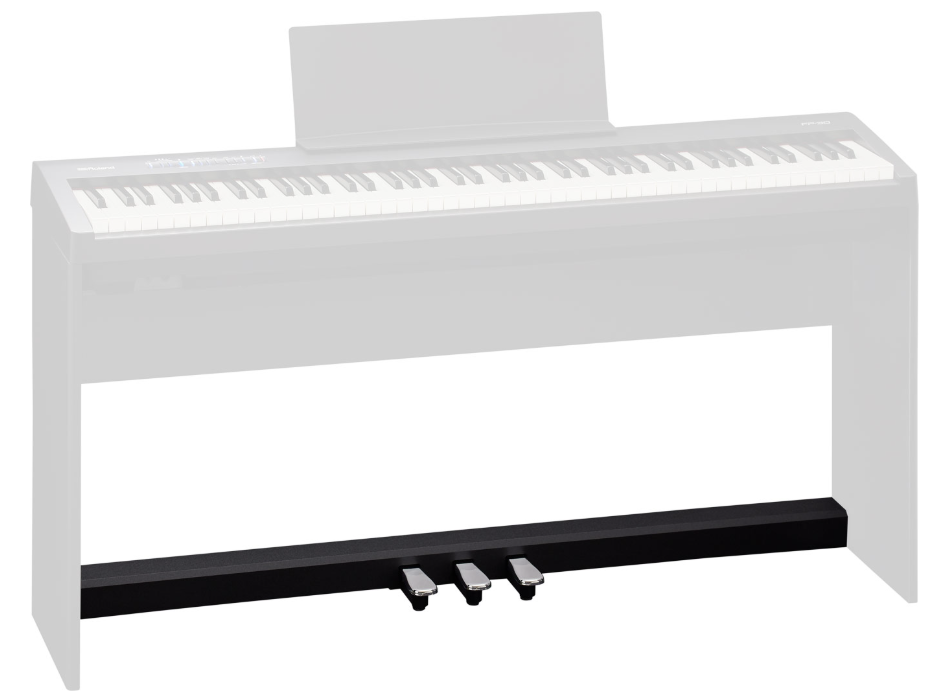
- Then we have a triple pedal port which can be used with the Roland KPD-70 triple pedal (which does require the matching stand) to give you soft, sostenudo and sustain functionality
- For BlueTooth, the FP-40 has Bluetooth audio in (for streaming in external audio wirelessly) as well as BlueTooth MIDI which allows you to send MIDI to an app on a device wirelessly (although I personally would never use wireless MIDI; there’s always at least SOME lag; just use a cable!)
- And a pretty unique new feature on the FP-40 is onboard WIFI; this will allow you to have firmware updates installed directly (without having to download them onto a flash drive using a computer first), and it is also used with the Piano Sphere app (which I’ll be going over in a bit)
So overall, the FP-40 has a pretty good set of connectivity available; I will miss the 1/4″ headphone port, but the ability to connect a mic enabled headset is pretty cool, as is the addition of WIFI for firmware updates. One thing I would like to see Roland do is follow Yamaha’s lead and come out with a standalone triple pedal option that doesn’t require buying the wooden stand.
Other Features
Portability
For portability, I definitely wouldn’t put the FP-40 in the “super portable” category; it is a tiny bit less bulky in dimensions and a tiny bit lighter than the FP-30X, but at almost 31 pounds it is still heavier than pianos like the Yamaha P-225 or Casio PX-S1100, both of which weigh in at about 25 lbs. But it is nice to see that Roland has trimmed it at least a bit; and there are lots of other fully weighted pianos that weigh well OVER 30 lbs, so it’s not bad.
Speakers
The speakers on the FP-40 have seen a big upgrade from the prior model (and to be honest, the speakers are what I think are the best new feature on the FP-40; even more so than the sound engine upgrades). The FP-30X had two downward facing 11 watt speakers for a total of 22 watts. The promotional info (from ANY manufacturer, not just Roland) for a keyboard with downward facing speakers has always been something along the line of: “the sound bounces off the floor and back up to the player creating a super realistic ambient listening experience” Well . . . MY experience with downward facing speakers has always been the OPPOSITE; I have NEVER liked the sound of downward facing speakers on ANY digital piano or keyboard – to me they just sound muffled, and lack any clarity.
That’s why I was super happy to FINALLY see upward facing speakers on the FP-40; there are two 8cm x 12cm speakers, with 12 watts each for a total of 24 watts, aimed right at the player. So only a slight wattage increase, but the sound of these speakers is night and day better than the FP-30X, so this is super nice to see.
Here is a quick demo on the speakers (just as picked up by the built in mic on my iPhone).
App Compatibility
Roland Piano App
I have already mentioned the Roland Piano App a couple of times in this review; this is the app that will help you adjust settings, choose voices etc – basically a graphical user interface to help you work with your FP-40 without having to use the clunky minimalistic onboard user interface (which is why I used it for this review). This app also gives you some added features and functionality, including an additional 265 tones, rhythms & accompaniment that you can play along with (turns the FP-40 into an arranger keyboard), songs, sheet music scores, training games as well as now having the Piano Designer functionality for fine tuning your main 3 piano sounds.
While I do think this app has been improved a bit since i last used it, I personally still find it to . . . not be super intuitive or super easy to use, especially when compared to the Smart Pianist app from Yamaha, but it is still a big improvement on having to memorize key combinations for settings and selecting sounds. It’s totally fine for home, but I would be a bit hesitant depending on this app on stage at a gig.

Roland Piano Sphere
This is the BIG new addition to Roland’s apps; this is a piano training app developed by Skoove (which is one of the big piano apps out there, competing with the likes of Simply Piano). Piano Sphere is integrated into the FP-40 using the new onboard WIFI connection (there’s even a “Piano Sphere button” on the front panel). There is no subscription required, and this app includes personal lessons (divided into 3 courses from beginner to advanced) as well as a bunch of free song lessons. I only had time while renting the FP-40 to briefly look into this app, and it looks to be pretty cool, very much like Skoove itself (which isn’t surprising, I’m sure much of the content is borrowed from or common to Skoove’s actual courses). Like many of these apps, it does APPEAR (at first glance anyways) to require learning to sightread (which isn’t MY thing; I can’t read sheet music at all), but it is cool that Roland has partnered with Skoove to include something like this at no extra coist.
Any Negatives?
The only negative I need to mention with the Roland FP-40 (as you can probably guess) is the user interface; needing to rely on looking up or memorizing function key combinations to edit settings or even change sounds. Even if I LOVED the PHA4 action, and LOVED the sounds on the FP-40, the user interface alone would keep ME from buying this piano. But remember, my opinion also applies to ANY manufacturer’s piano with the same issue (like the Yamaha P-145, Casio PX-S1100 or PX-S5000 or the Kawai ES60).
But all my . . . complaining about the user interface aside? There isn’t really anything else I would call a negative. The FP-40 is a BIT on the heavy side, but all fully weighted and graded digital pianos are at least 25 lbs, and many are over 30; that’s just the price you have to pay for getting a sturdy, fully weighted key action.
The Competition
Roland FP-40 ($750 USD) vs. Yamaha P-225 ($750 USD)
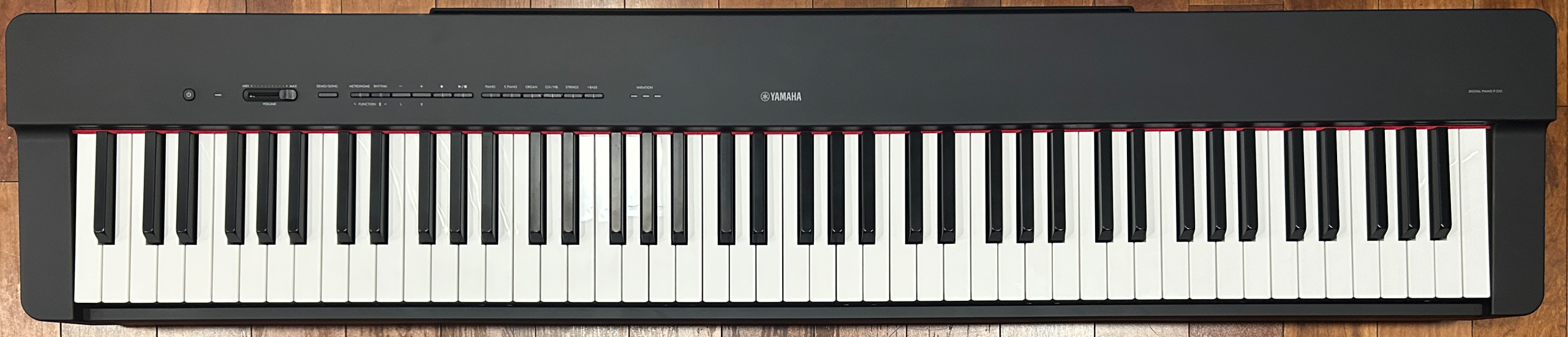
So as always, Yamaha’s P-Series will have a model that is probably the single biggest direct competitor to models in the Roland’s FP line. The FP-40’s direct competitor would be the Yamaha P-225; they both currently sell for about the same at $750 USD. But as I’ve mentioned in some other recent reviews, these 2 might sell for VERY different amounts outside of the US; for example in Canada, the Roland FP-40 sells for about 25% MORE, at around $1280 CDN, while the Yamaha P-225 only sells for about $1000 CDN. For whatever reason, Roland products have ALWAYS sold for more (relative to the competition) in Canada than they do in the US. So make sure you keep relative prices in mind wherever you are when comparing these 2 (or any other keyboards).
Going back to their prior models (the Roland FP-30X and the Yamaha P-125), there has always been a lot of online debate on which of these pianos is “better”, but to be honest? They’re both fantastic options; in my opinion, which one is best for YOU comes down to YOUR preferences on a couple of key things: key action and the user interface. Now as I’ve always said, key action is 100% personal preference; MY personal preference would be the GHC dual sensor action in the P-225, but there is NO DOUBT that the triple sensor Roland PHA4 action is technically superior, and it’s DEFINITELY a more realistic piano action. So if having the most realistic action possible is important to you, you’ll definitely prefer the FP-40 (but again . . . it’s always best to go to a store with your headphones and do as much in person testing as possible before making a decision).
In terms of voices, this is also personal preference; in general, Roland pianos tend to be warmer, with a bit more emphasis on the low end, and Yamaha’s tend to be brighter, but to be honest? The voices on both of these pianos are spectacular, so unless you “really like” one piano tone over the other, I personally don’t see that as a massive issue. Although I have to say (being a fan of Hammond organs) that being able to trigger changes in rotary speaker speed is a pretty cool bonus on the FP-40; you can actually flip rotary speaker speed on one of the Yamaha P-225’s organ voices as well, but you need a triple pedal unit to do that.
Now when it comes to the user interface, the P-225 wins that battle EASILY. The easy to use and super intuitive buttons on the front panel allow you to select voices easily (without having to use key combinations), AND you can just glance at the panel and immediately know what your current voice is. And another big functional difference in Yamaha’s favour is that it has built in rhythms and bass accompaniment that you can play along with.
So which one would I buy? The Yamaha P-225, because I still do prefer the key action, I LOVE the straight ahead button driven user interface; I’ve used this interface on stage multiple times (with a P-125; the interface is the same) and it was awesome. And, the built in rhythms are handy to practice with. And also, as I mentioned earlier, where I live the FP-40 is 25% MORE EXPENSIVE than the P-225, so that would make the P-225 a much more likely option for me.
But . . . if your priorities lean more towards a more realistic piano key action or fine tuning piano sounds? You really should opt for the FP-40.
Roland FP-40 ($750 USD) vs. Casio PX-S1100 ($600 USD) or Casio PX-S3100 ($900 USD)
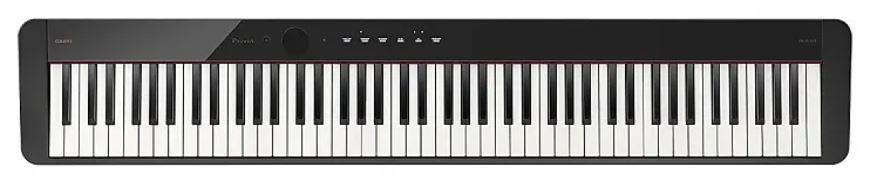
The Casio PX-S1100 is much closer in price to the FP-30X than the FP-40; this is partly due to the FP-40 being a BIT more expensive than the outgoing FP-30X model, and also because the PX-S1100 is getting due to be replaced, and prices on it have started to fall a bit. But this country to country issue with variation in relative pricing also applies to the Casio; in Canada, the PX-S1100 sells for $800 CDN, which is only 2/3 the price of the FP-40 which is at $1280 CDN.
Like the Yamaha P-225, the Casio also has fewer voices and a lighter, less realistic key action; but like the FP-40, the PX-S1100 also suffers from a minimalist user interface that requires key combinations to do pretty much anything. The one big thing in the PX-S1100’s favor is that it can be operated on batteries, and at 25 lbs, it’s got more portability features in its favor. So if you don’t care about a minimalist user interface and prefer a lighter action, the PX-S1100 might be a good choice for you and would even save you some money, but once again . . . if you’re after a realistic piano action, the FP-40 wins this easily.
Roland FP-40 ($750 USD) vs. Roland FP-30X ($650 USD?)
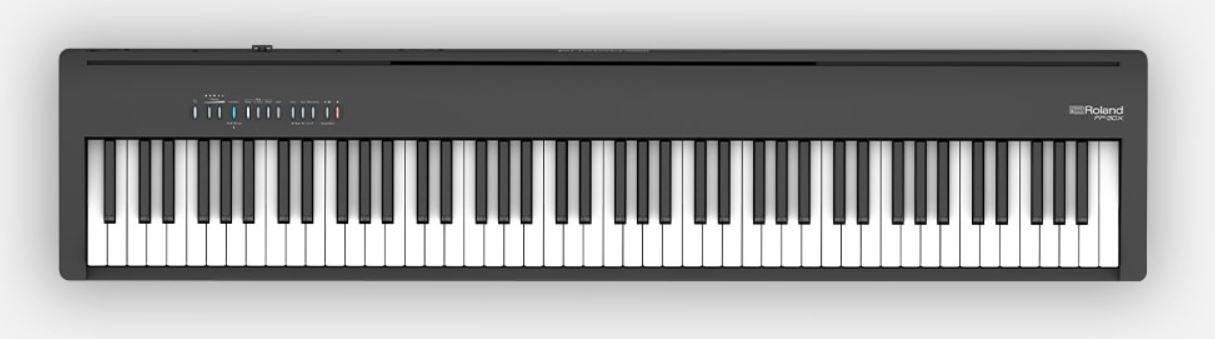
So what about the prior model? With the FP-40 having just been released, there are still new FP-30X’s out there, often discounted by $100 or more. So this really depends on your budget, but in my opinion? If I was buying one or the other, unless I found a REALLY HEAVILY discounted FP-30X, I would definitely pay an extra $100 or so for the FP-40. For me, that decision would NOT be about new or enhanced voices, but mostly about the player facing speakers which to me represent a HUGE upgrade. And the one extra voice category button, as well as (at least in my opinion) me liking the key action JUST A BIT more would also be nice extras. Once again though, country to country price variations come into play here as well; where I am, the FP-30X is down to $1080 CDN, so almost 20% cheaper than the FP-40 at $1280 CDN.
Roland FP-40 ($750 USD) vs. Roland FP-E50 ($1000 USD?)
So when I discussed the Roland FP lineup, I mentioned the Roland FP-E50 which is kind of a unique option in this series, because it has rhythms and accompaniment features, as well as a chord sequencer. So why am I mentioning this as a competitor or option that’s $250USD more expensive? One BIG reason; the FP-E50 has a REALLY nice user interface, complete with LOTS of onboard direct access buttons and controls, as well as a big screen displaying your current settings. So even if you ignore the rhythms and accompaniment, and chord sequencer features? If you are a big fan of the PHA4 key action, but don’t think you’d like the minimalist user interface on the FP-40? If you spend an extra $250 USD, you can go from a bad user interface to an awesome user interface, and still have the realistic keybed that you’re hoping for in a piano with a FAR bigger feature set . . . And (once again), prices are different depending where you live; where I am, the FP-E50 is ONLY $70 CDN more than the FP-40.
Roland FP-40: The VERDICT
The Roland FP-40 is definitely a “piano player’s piano”; the simple user interface, well respected PHA4 action, and high quality piano sounds are clearly aimed at players who are looking for a “realistic piano experience”; someone who 90% of the time just wants to turn on their keyboard and start playing piano.
If that describes YOU, the FP-40 is a FANTASTIC choice!
(especially at a price of about $750USD)
In addition to the key action and upgraded sound engine, you’ve got some great connectivity options that include BlueTooth audio in, proper L&R line outputs and a USB audio interface; and you’re also getting really good sounding upgraded speakers as well as an app that does enhance the user experience AND functionality. And, having a piano training app built by Skoove just . . . thrown in IS a real nice touch from Roland.
The one user that I would NOT recommend the FP-40 to is basically . . . ME; someone who is using their main keyboard for performing with lots of different sounds and lots of custom setups, so . . . someone who NEEDS a better user interface. If you’re thinking of the Roland FP-40 to use as a stage keyboard, I’d only recommend that if you intend to use only a couple of sounds, without any complex setups, splits or layers. If I REALLY wanted to have a stage keyboard with Roland’s PHA4 action, I would pay the extra money for the Roland FP-E50 in a heartbeat for the improved user interface.
So if you’re looking for a “piano player’s piano” with a realistic key action, great quality sounds & great speakers?
I can HIGHLY recommend the Roland FP-40!
Thanks so much, and happy keyboard playing! (and keyboard shopping 😉 )
Check out current pricing in your area:
Piano Training I Recommend
I’ve taken a number of online piano courses and tried various piano learning apps; the ones I’m listing here are my favorites and I can highly recommend any of these if you are looking for some online training to get started on learning piano, or to take your current skills to the next level.

Bird’s Piano Academy is one of my absolute favorite online piano programs. Arthur Bird has created multiple courses on getting started learning piano quickly as well as great intro courses on Blues, Jazz and more. And his courses are chord based, so you don’t have to read sheet music which is AWESOME and definitely the fastest way to learn to play modern music. You can go with a subscription that includes ALL his courses, or you can buy individual courses a la carte with LIFETIME access – HIGHLY RECOMMENDED!
If you’re looking for the least expensive way to get started on piano, Pianoforall is a great option. It’s a unique course created by Robin Hall that uses downloadable eBooks with embedded videos and audio instead of a website.
This course is an amazing option for learning piano from beginner up to being able to perform; it teaches multiple genres of music and focuses on how to be a “one person band” on the piano. This course is taught by pro pianist Steve Lungrin – Steve has been teaching and performing his whole adult life and is a fantastic instructor and performer.
I took this course from 2020 to 2021 and it elevated my playing from a very basic level to being able to play songs in multiple genres.
I was super excited when Simply Piano added the “Chords Path” to their super popular piano training app (iOS or Android); this path allows a new student to get started learning piano using a chords based approach (which I HIGHLY recommend over a traditional approach). Learning to play using chords is by far the easiest and fastest way to learn to play modern songs (MINIMAL sightreading ability is needed). I did the entire chords path, and can highly recommend that you check it out (you will get a trial period so why not?)
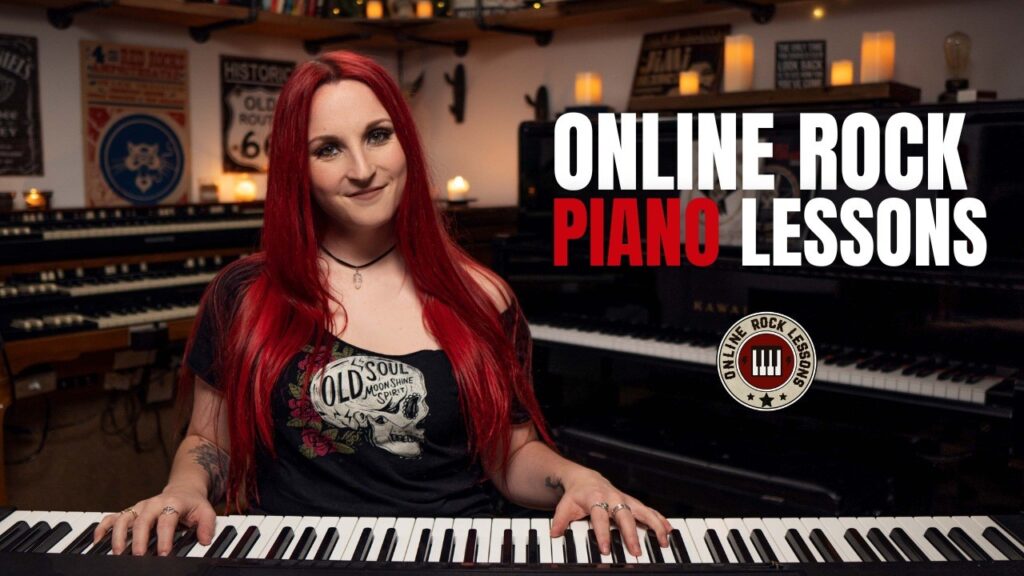
This is a fantastic option if you are mostly interested in rock music. This course was created and is taught by Marine Lacoste, who is not only a fantastic instructor & pianist, but she is also a very accomplished hammond organ player – she performs regularly with her own band, as well as playing keys regularly for multiple recording artists on tour. I started this course in 2023 when I joined a band, and it is helping me greatly in taking my playing to a new level. And Marine is constantly adding new content, and is very active on the platform.
If you sign up for Online Rock Lessons yearly subscription, use code PIANOTONE at checkout to let Marine know I referred you, and she will give you some free bonuses!

This is a fantastic (but pretty unique) online program for taking your piano and organ playing skills to the next level, developed by pro piano, keyboard & Hammond organ player Mike Little. Mike shares tips & tricks accumulated from over 30 years of pro touring, gigging, studio & production experiences. This course isn’t for a COMPLETE beginner, but you don’t have to be a super accomplished player either, to get TONS of value from this program!

Ultimate Piano isn’t an actual course to learn how to play, but it IS a really helpful TOOL for piano students. You connect your keyboard to your computer, go to Ultimate Piano’s website (so NOTHING to install!) and you have a ton of helpful training and exercises at your disposal, as well as built in piano sounds. With the help of on screen light up keys, you can learn and practice scales, chords and even ear training and you can play along with MIDI or audio files, and even YouTube videos to practice songs!