So are you looking for a single keyboard solution for stage use? Something that you can use for piano, synth & even Hammond organ in one keyboard? You’d love to buy a Nord Electro but you don’t want to spend $3000 or more USD? You could go down in price to the Yamaha YC series, or Viscount Legend One but maybe you don’t want to spend over $2000 USD; then there’s the Yamaha CK88 at $1500 USD, but are there any less expensive options? Yes there are!
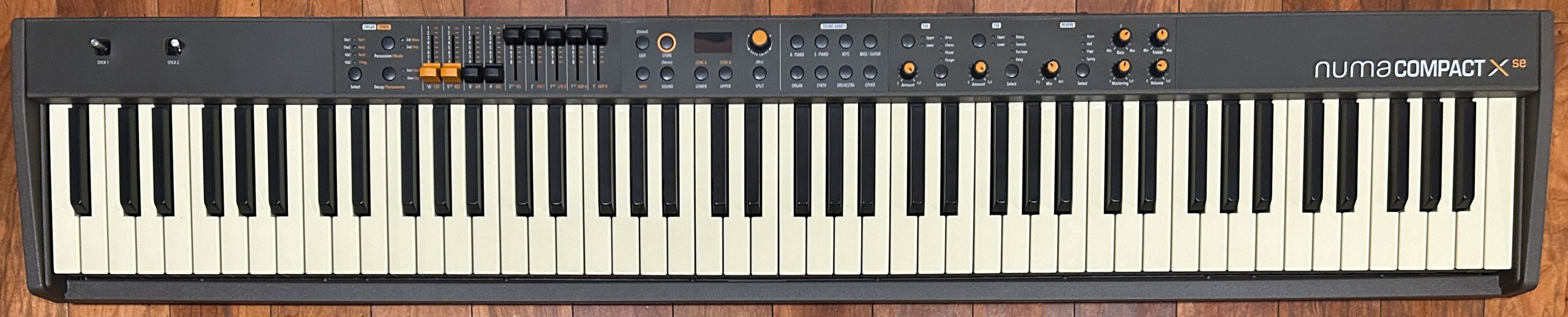
This is my review on the Studiologic Numa Compact X SE (and FYI, MOST of this review will also apply to the less expensive model, the Numa Compact SE). These are the updated versions of the Numa Compact 2x and Numa Compact 2; these new versions came out in 2024. I owned the 2X for a little over a year, and REALLY liked it. I did review the 2X (you can check out that review here), and in that review I said it was one of the best (if not the best) entry level stage keyboards on the market, and even though these new models have crept up in price a bit? They HAVE seen some noteworthy improvements, and are still a fantastic value.
I used the Compact 2X along with a Hammond M-Solo for gigs with a couple of blues bands for a year or so, and that combination worked really well. As a matter of fact, if you saw my video from early 2026 where I listed all the keyboards I’d owned up to that point, you’ll know that the Numa Compact 2X was one of the 3 keyboards that I said I wish I still had (along with the M-Solo actually), and was likely to buy again, so . . . here we are! Let’s check it out!
Numa Compact SE & X SE
What IS A “Stage” Keyboard?
Yes, a stage piano or keyboard is MEANT to be used in performance situations; but . . . what does that actually mean? Well to sum that up in . . . just one KIND OF long sentence, a “stage” keyboard or piano SHOULD have: good connectivity options, a great user interface so you can adjust all the settings and things your performance requires, quickly and easily, AND you should also be able to glance at your keyboard and immediately see WHAT your current settings ARE; it should have registrations so you can store your custom setups for quick and easy recall, it should offer a level of portability that’s appropriate for your intended playing situations, and it should have the voices and other options like key action that meet whatever your personal needs are as a player.
The Numa Compact SE & X SE meet all of these needs with flying colours:
- it has great connectivity (including L&R line outs, a USB audio interface AND 5 pin MIDI in and out ports)
- it has a VERY simple and intuitive user interface, and you can access all the settings you need to change on the fly with direct access buttons and no menu diving – AND you CAN just glance at the front panel and immediately know what your settings are
- it has 120 registration slots to save your custom setups
- it has a FANTASTIC semi-weighted hybrid key action from Fatar that works REALLY well for either piano or organ
- it’s insanely portable for an 88 key keyboard; it’s SUPER compact and only weighs 15 lbs!
I’ll talk about how great a value these keyboards are more in the competition section, but these probably are the best value entry level stage keyboards on the market today, especially if you want a single keyboard solution for gigs.
Numa Compact Lineup – Feature Comparison
Studiologic keyboards aren’t often stocked in stores (at least where I live), which IS unfortunate – I had to order my X SE sight unseen. As a result, I was never able to test out an X SE in person to compare it against the 2x I used to own. Since the prices of these new models did jump noticeably from the prior versions, along with the limited specs & online demos available, I kind of assumed there wasn’t much of an upgrade to warrant the price difference, and I kept my eyes on the used market for MONTHS looking for a used 2x, but never came across one. So I decided to roll the dice and order an X SE, and I have to say; I was wrong – there HAVE been some pretty significant improvements, and I’m super happy with my purchase (I really DID miss my Numa Compact).
Studiologic does have a great feature comparison of the 2 old models with the 2 new models on their website if you want to check it out; I’ll just mention the highlights here.
Improvements Over The Prior Models
- there are now 4 separate tone engines (acoustic, electric, organ & synth) as opposed to 2 engines (organ and synth) combined with sampled sounds (so the acoustic and electric pianos on the new models are more than just sampled sounds, they can be edited)
- piano sounds are now derived from the Studiologic Numa Piano series (which is a big upgrade that even my ears could hear right away), and polyphony has been increased from 128 to 200
- number of factory sounds have been increased by about 50%
Difference Between the X SE and SE
The organ and synth engines are the same on both models, but the X SE offers on the fly customization than the SE does not, with the buttons and sliders on the left half of the user interface. The organ engine uses these buttons for percussion, chorus and vibrato, and the sliders are used as organ drawbars. The synth engine, the buttons are used to control mono, portamento, leggato and staccato settings, and the sliders are used to control synth settings such as cutoff, resonance, attack, release, filter etc.
I almost bought the SE instead to save some money (with the thought of then adding a full on organ to my collection as well), but then I thought for the extra $300 USD why not spend a bit more NOW and have full functionality in ONE board, so that’s what I did. And as it turns out, even if I was to buy a full on organ again, I’m quite liking having the synth editing ability the X SE offers as well. My recommendation for you? If you are mostly interested in playing the piano & electric piano voices, and organ or synth aren’t super important to you, then save some money and get the SE; but if you play alot of organ and/OR synth, the X SE is definitely the right choice.
Key Action
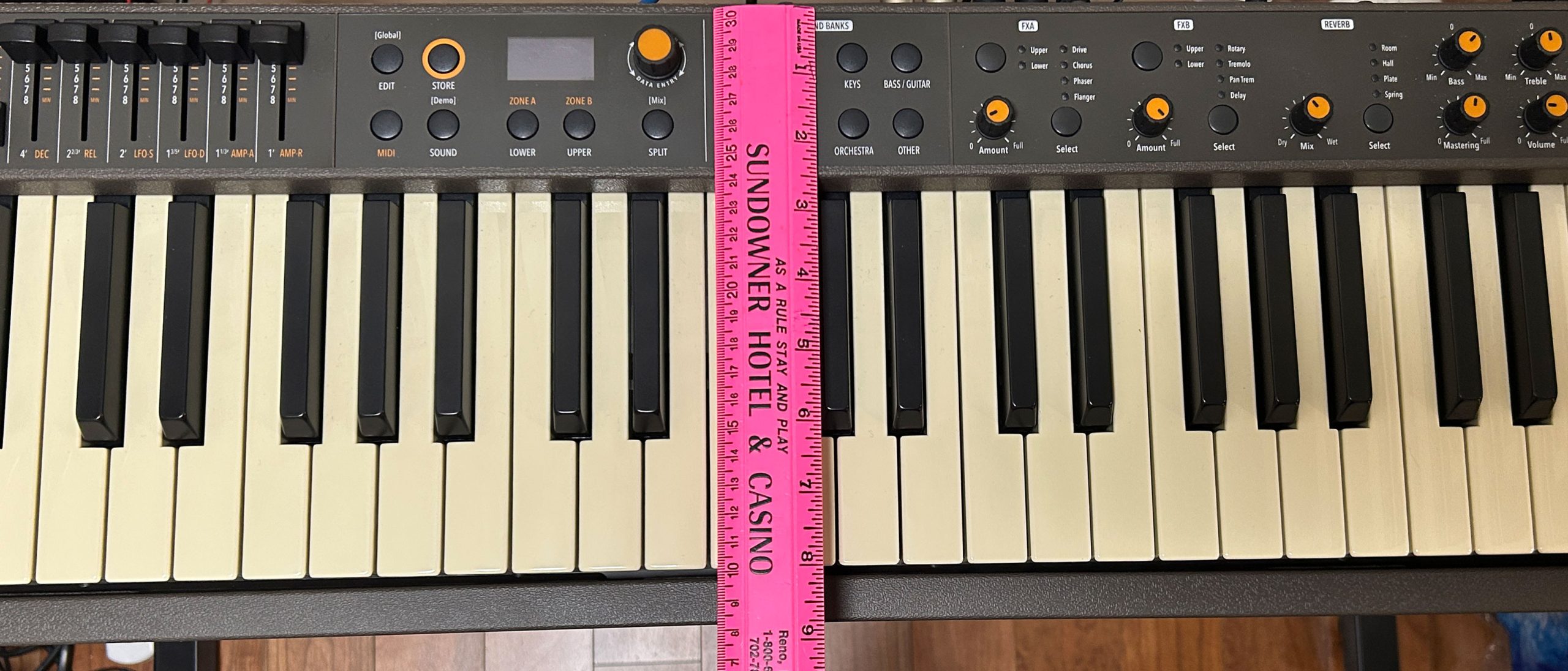
Key action is DEFINITELY one of the main highlights of the Numa Compact series; the key action in the new models is the same as the prior models: the semi-weighted Fatar TP/9P action WITH aftertouch and a dual switch detection system. The keys are a true full size width (with an octave width of about 164mm), but the keys aren’t as long as most full size piano keybeds; they are about 5.5 inches long as opposed to the 6 inches you find on most fully weighted digital pianos. It’s important to note here that even though these ARE budget/entry level stage keyboards? This is NOT a budget or entry level key action; Fatar makes fantastic keybeds.
So what do I like about this action? It’s my SECOND favorite hybrid key action ever (and by “hybrid” I mean it works well for both piano AND organ playing). The only hybrid action that I like better is also made by Fatar; it’s the Fatar TP/8P action found on the 73 key Viscount Legend One. That action feels VERY CLOSE to the TP/9 found on the Numa, but the keys are longer, and they just feel a BIT higher quality (but the Legend One 73 is more than DOUBLE the price of the Numa Compact X SE).
The keys have a very nice & solid semi-weighted feel to them. Alot of semi-weighted actions can feel “mushy” or “heavy and sluggish” when manufacturers use stiffer and stiffer springs to try and mimic a weighted feel; that’s not at ALL the case on the Numa, this keybed is very responsive, and fun & easy to play fast rock piano on. And I also feel totally at home playing slower ballad piano pieces on this action because it’s easy to control my dynamics. You do have the option of soft, normal or hard for touch response; the normal setting feels perfect for me, while on most synth style actions I tend to prefer the hard setting. But keep in mind, with the shorter keys, they are a BIT harder to play as you play INTO the keys, so if you’re mostly interested in playing classical or more detailed piano pieces, you will probably prefer a keyboard with a fully weighted and graded hammer action.
But where the Numa Compact X SE action REALLY shines? The fact that it’s not only good for piano, but it’s also REALLY good for hammond organ; this is actually pretty rare, especially on 88 key keybeds that have piano shaped keys (so keys with a lip over the front edge as opposed to proper waterfall organ shaped keys which are also a tiny bit smoother or even rounded on the front).
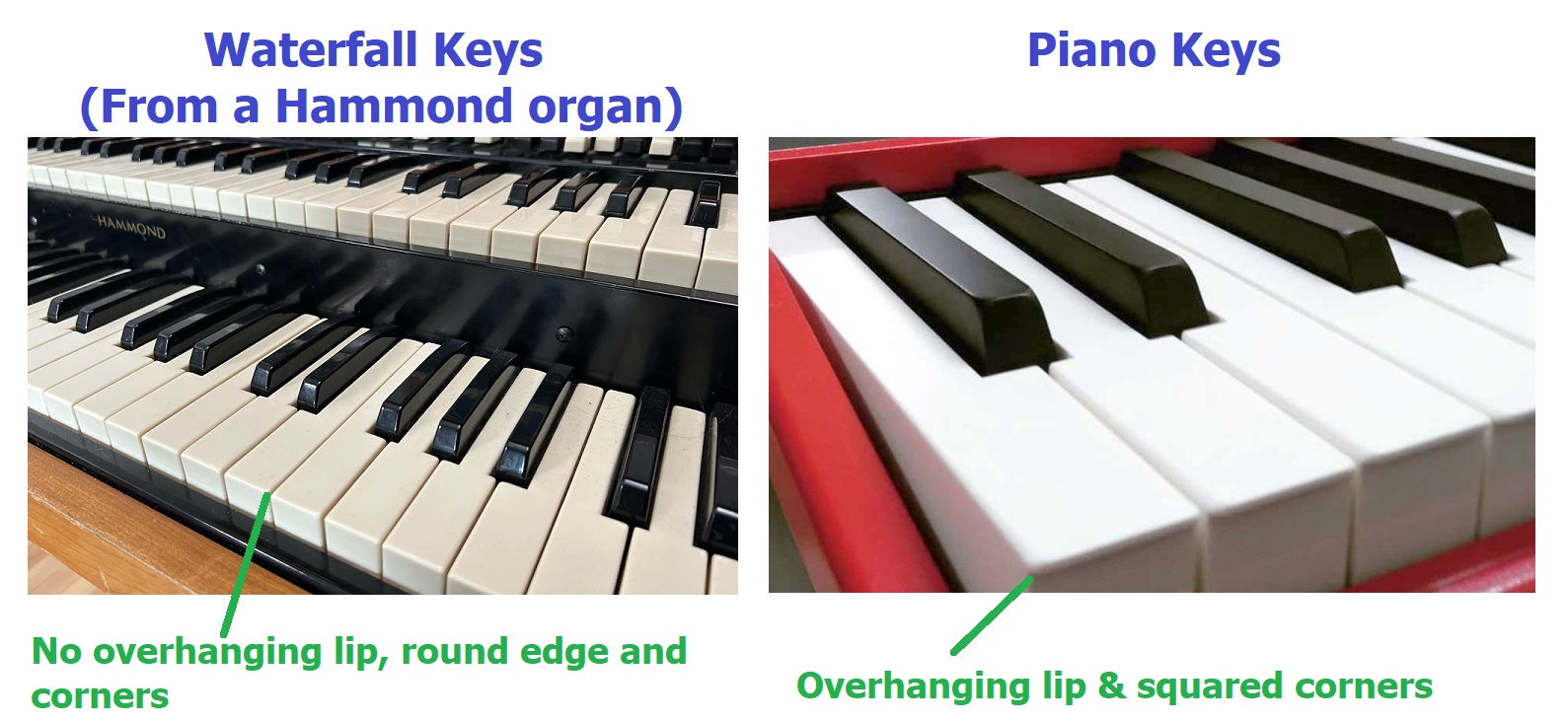
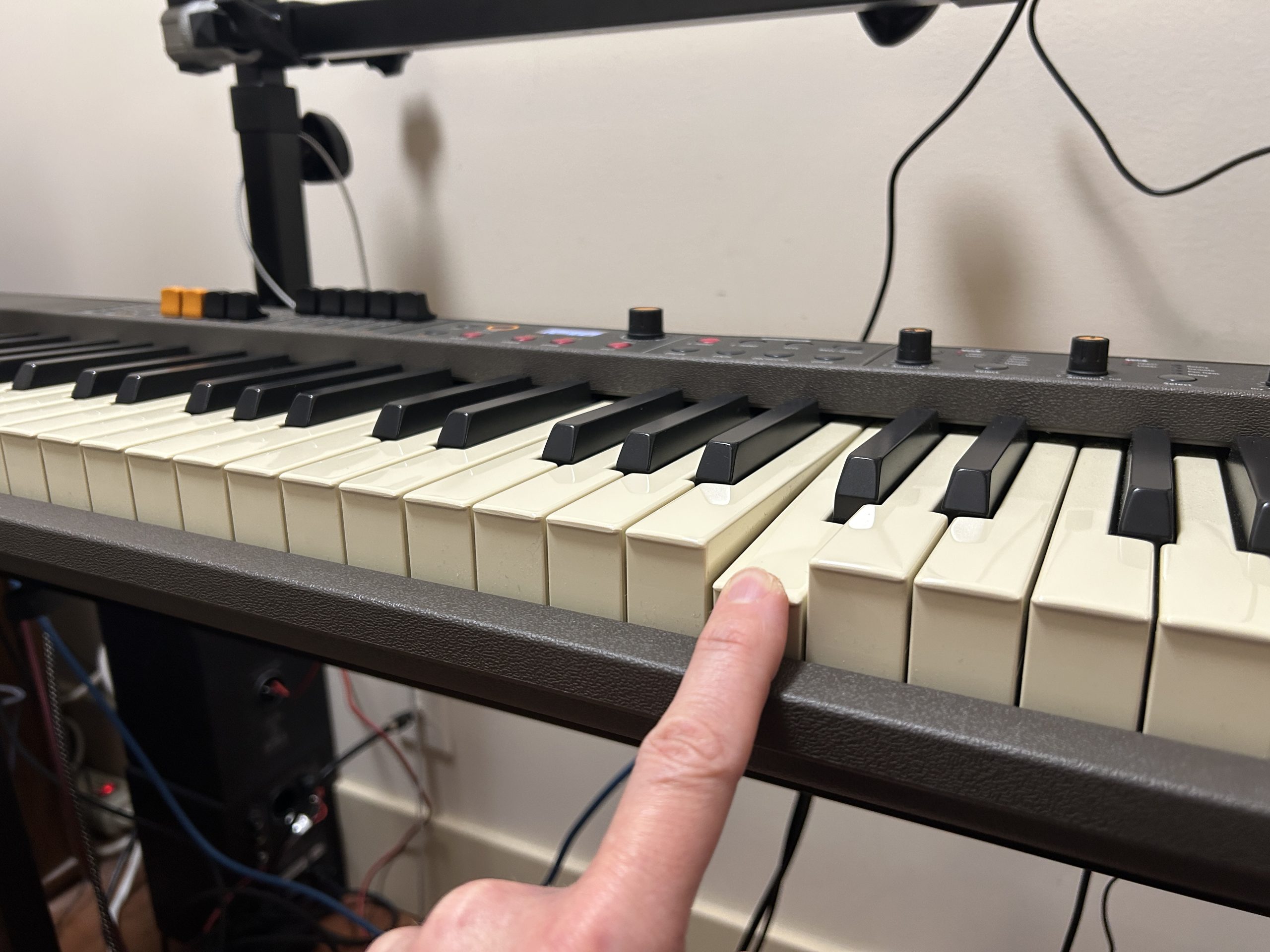
So even though the Numa Compact X SE DOES have piano shaped keys? They still feel REALLY good for playing organ. Maybe that’s because Fatar also makes probably the best & widely known organ action EVER, which is the TP/8O semi-weighted waterfall action. That action is found in lots of high priced “clonewheel” keyboards including Hammond clones, the Nord Electro and more. It is definitely my favorite organ key action of all time, so maybe the TP/9P found in the Numa Compact shares some of the TP/8O’s build, because it does feel similar. While the Numa’s keys do have lips over the front edge, they are ever so slightly rounded; that in combination with the high quality semi-weighted feel makes organ techniques like percussive playing and palm smears or glissandos feel easy and comfortable.
Only other things to mention with regard to the keybed is that (as far as Studiologic’s specs go) the less expensive Numa Compact SE has the identical keybed, and that Studiologic decided to colour these keys with an offwhite kind of ivory or possibly retro yellowish colour (if you care about those things).
So my summary on the Numa Compact X SE’s key action? It’s an AWESOME hybrid action that feels good for both organ and piano; and since it’s only semi-weighted? That’s a big reason that the Numa Compact X SE only weighs 15 pounds!!!
User Interface
The user interface on the new Numa Compact models remain pretty much unchanged from the prior ones, but that’s NOT a bad thing (although there are a couple of things I would have liked to have seen added). The thing I like so much about this user interface is that it is SUPER simple to use, very intuitive, and pretty much everything you need to access on the fly is right at your finger tips.
Both the SE and X SE have two joysticks on the left; one sticks in position and the other returns to centre after you let go; you can assign various functions to these (I use the “non-snapping” one of configured to control the rotary speaker speed for organs). The X SE adds live controls for your organ or synth engine; there are buttons (used for chorus, vibrato and percussion on your organ engine, and for portamento, mono or polyphonic, staccato and legato on your synth engine), and there are sliders which act as your drawbars for organs, and adjust various synth settings like attack, decay, filter settings, etc for your synths. And the cool thing with the sliders, is as you move those you will see your setting changes reflected on screen.
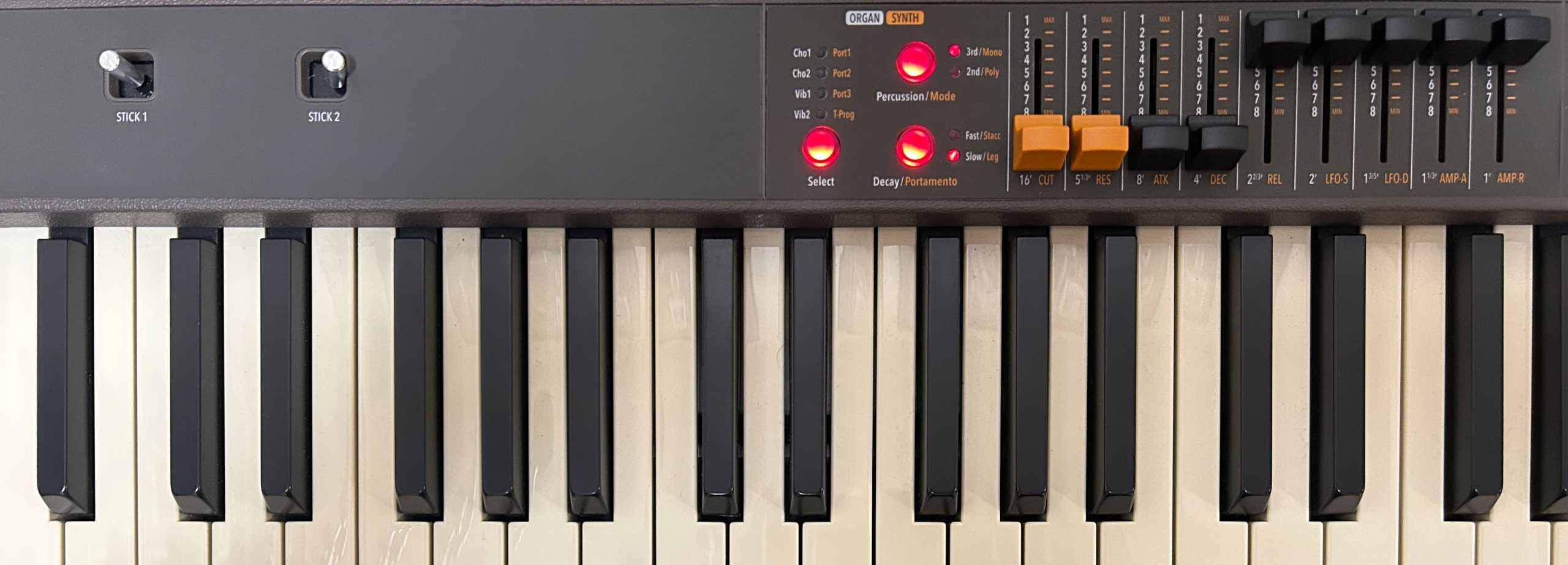
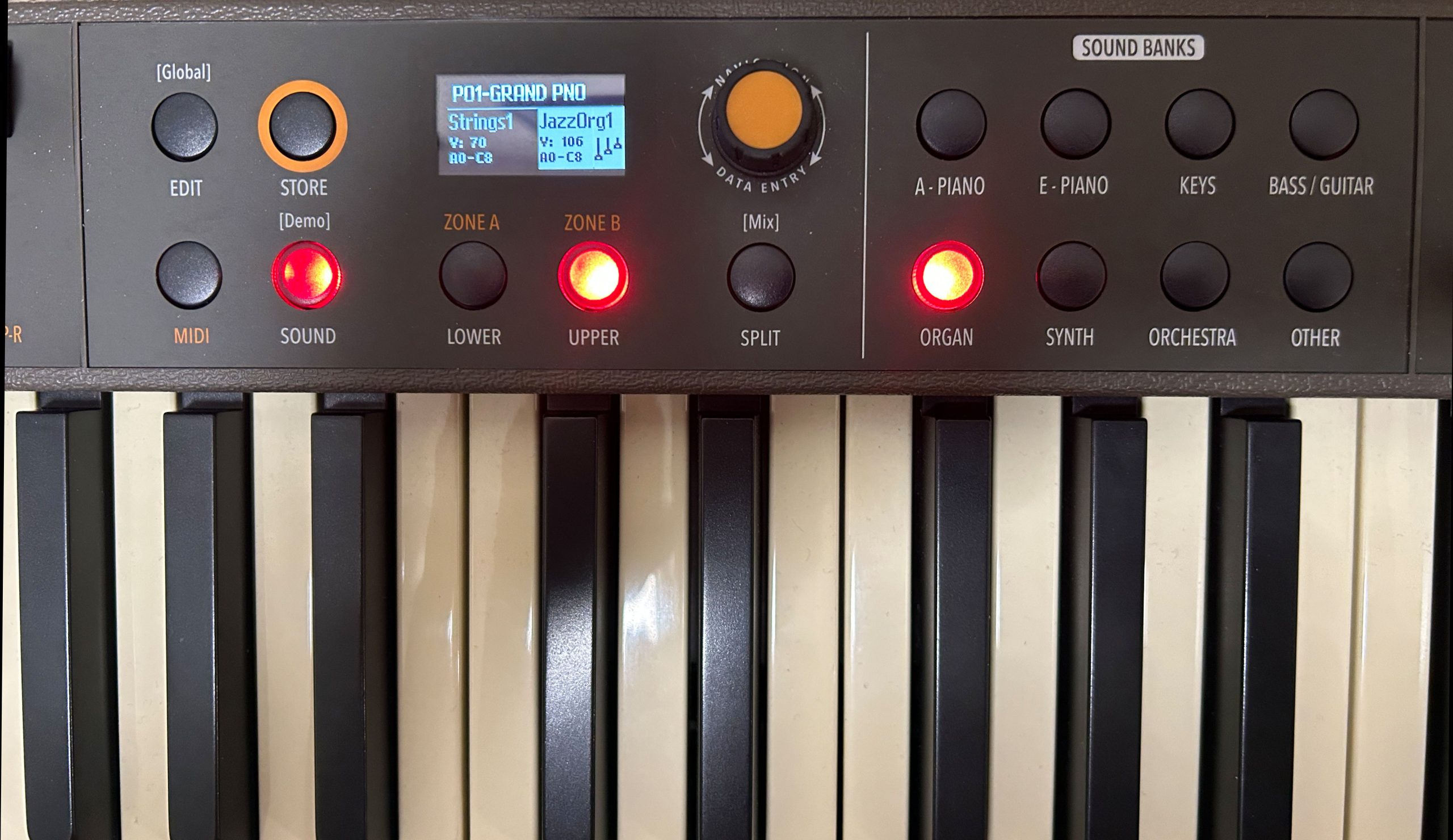
The centre section is where you setup your sounds & combinations and save them as registrations for quick and easy recall; there are 120 registration slots available, with the first 60 coming preloaded from the factory with some common setups; I can use the knob to scroll through the registrations super fast, or I can press it and then scroll through a list of them instead; I’ll go back the first registration. Now while the screen is tiny? Studiologic has chosen to display the most useful information on it – you can see I’ve got a piano for my upper voice and some strings for my lower voice; right now you would only hear the piano but you’ll notice the lower light isn’t lit – if I press that button it lights up, so now that voice is active as well and they’ll be layered together. And if I want them split instead, I just press the split button and now they’re split. For choosing different sounds, you can press the upper or lower button to highlight that zone, and then use the category buttons to scroll through available voices. This works fine, but this is one part of the workflow I wish Studiologic had changed on the new version; when you press a category, you have to be FAST to scroll through voices because after a couple of seconds, that screen goes away (which means you’d have to press the voice category button again); not the end of the world, just takes some getting used to.
So as I mentioned earlier? Just takes a glance at the user interface to immediately know what your setup is – this is pretty cool!
For editing various settings, you’ve got 3 locations to choose from. While highlighted on one of the voice zones, you can press the EDIT button and that takes you into the “part edit” mode, where you can scroll through and adjust various settings for your lower and upper voices (and then save those settings into a registration if you want to). If you’re in MIDI mode, pressing edit while one of the zones is highlighted takes you to the zone edit (so you’ll have access to some MIDI settings such as your channel in there). If you’re highlighted on the program name (so your registration) and press EDIT you can modify settings specific for that registration. And finally, you can LONG press EDIT to open up the main keyboard settings menu. Now I actually want to talk about two of these global settings here, one because I think it’s important for you to know, and the other because I’m HIGHLY recommending that you change that one from the default setting.
So the first one that I just want to make sure you’re aware of is the FX AUTOSET; this defaults to on, which means the functions assigned to the 2 joysticks will be assigned automatically (based on the current voice) and you can’t change those assignments. So far, I’ve been fine leaving this setting where it is, but if I wanted to have more control over what each stick does, then I could turn that setting to off.
Now the other setting (that I think you should change from the default setting) is the SLIDER MODE. The default is DIRECT, but I’m recommending you change it to SNAP, and here’s why. Remember I mentioned when you move a slider for an organ or synth voice, the settings are displayed on screen? Well they are, BUT if you leave it as DIRECT, then the second you move a slider it changes the setting. For example if I choose JazzOrgan1, I happen to KNOW that this voice has the first 3 drawbars engaged; but there is no way to SEE that on screen without moving a slider; and if I have the setting as DIRECT, it will immediately adjust whatever drawbar I touched. This is even worse with the synth voices; the second I touch a drawbar, it will instantly modify that setting on the synth (which can be pretty drastic). So if I change that setting to SNAP, moving a slider WILL bring up the display right away, but it WON’T affect the actual setting until I move it to where the actual setting currently is. So now, if I move a slider for a synth voice, if you watch the display the on screen slider will turn white once the slider’s physical position matches the setting, and THEN it will start to adjust. With the organ voices, moving a slider brings up the drawbar display, but won’t modify the actual setting until the physical position matches.
Now I should also mention that there is a ton of MIDI functionality built into the Numa Compact (including proper 5 pin MIDI in and out ports for connecting to other hardware). I will be going over this in more detail in the voice demo section of the review, but for now I just wanted to mention that in addition to the 2 sound banks for built in sounds, we ALSO have 2 sound banks for MIDI sounds, in zones A & B. So if I press the MIDI button, the display will change to show Zone A and Zone B instead of “upper and lower”; so I can connect the Numa to a VST or sound bank app on a device with USB and assign those sounds to these 2 zones. And since the Numa has an audio interface built into the USB port? The sounds from those apps will come straight back from the device and into the Numa’s speakers, headphone and line out ports and WITHOUT ANY LAG. So, you can even layer or split external sounds TOGETHER WITH the built in sounds on the Numa which you access and setup by switching back to the sound section.
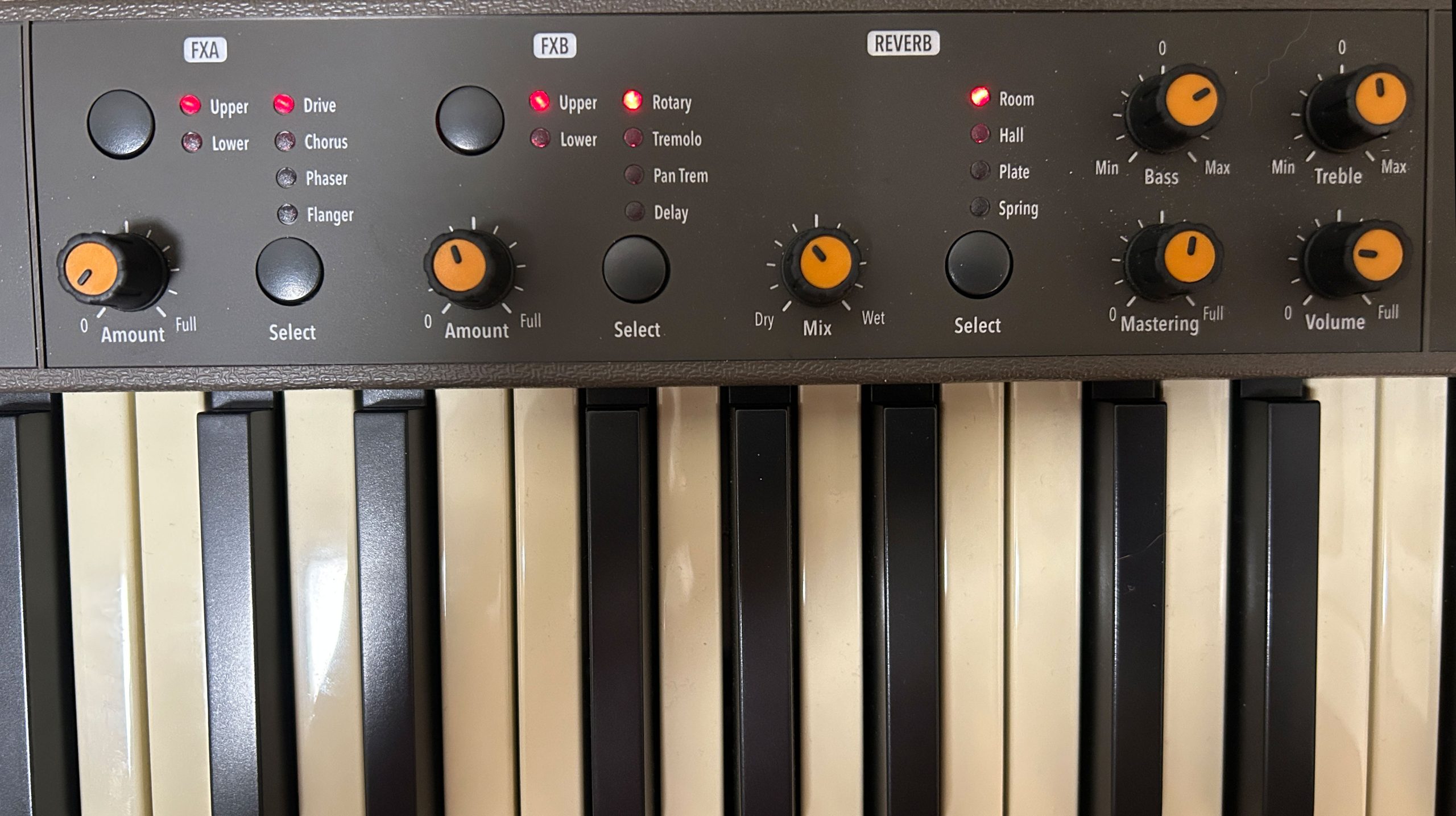
Now over on the right is the effects area – I love how Studiologic implemented on the fly effects on these keyboards. Instead of deep diving into a menu system to choose from and configure hundreds of effects, the Numa uses intuitive physical controls to quickly and easily apply & configure just a handful of the most common bread and butter effects to your upper and lower voices. We have 2 sections: FXa & FXb, each having 4 effects to choose from – so you can have up to 2 effects simultaneously applied to each of your upper and lower voices. You just use the buttons to toggle between your upper and lower voice, choose your effect, and then set the amount with the dial. Then at the far right we have a reverb section with types to choose from and a level knob (the reverb applies to the whole keyboard) and to the right of that some EQ and volume settings that are also global for the whole keyboard. So for those out there that WANT hundreds of effects to tinker with your sounds, the Numa may not meet your needs; but for me, I love the simplicity and ease of use.
So any complaints on the user interface? I was thinking I’d have 2 complaints until I found the “Snap” setting I mentioned earlier, but I do still have one. For my Hammond organ patches that have a rotary speaker effect enabled, the right joystick (so the one that stays in the position you left it) is automatically set to flip the rotary speed back and forth which is great. BUT, I also have the sustain pedal set to do that to keep my hands free; only problem is, if I use the pedal to flip the rotary speed there’s no visual indicator telling me if it’s currently fast or slow (and believe me, I HAVE encountered situations at gigs where I can’t hear myself well enough to tell if it’s going fast or slow). It would be a REAL nice addition if Studiologic just added a backlit button for the rotary speed (or even just a light indicator).
But my overall opinion on this user interface? Fantastic – I love the simplicity, the fact that you can glance at the front panel and immediately see & easily edit everything you need to in the moment.
Voices
The X SE and SE both have 148 factory sounds, which is up from 100 and 88 (respectively) on their prior versions. But more important than the number of sounds, is that the new models both have 4 dedicated sound ENGINES: an acoustic engine for acoustic pianos, an electric engine for electric pianos, a revamped organ engine, and a synth engine. So what does “engine” MEAN? Well I am NOT claiming to be a knowledgeable keyboard sound engineer, but the basic idea here is that an engine can modify the base high resolution sound samples on the fly. For example, the new acoustic piano engine (which is derived from the Numa X piano line’s technology) now includes adjustable string resonance, duplex resonance, hammer noise & damper noise. The electric piano engine combines a mix of samples and effects for added realism, and has adjustable tine volume & damper noise; the tine volume feature is actually really cool, because you can adjust your favorite electric piano voice EXACTLY as you like it.
The tonewheel organ engine on the SE and X SE is brand new, and includes improved rotary, chorus & vibrato effects. And even though the SE doesn’t include the drawbars or other realtime controls for organ settings that the X SE does, the base samples ARE derived from the same improved organ engine; you just can’t modify those on the fly with the SE. The good news here for SE owners though, is that there are multiple common organ presets available, AND multiple common registrations with various common organ setups. The virtual oscillator synth engine is also brand new, and once again the SE has a lot of great samples and registrations built in. X SE owners can take advantage of additional buttons to modify portamento, monophonic or polyphonic and staccato or leggato settings, and use the sliders to modify the sound wave on the fly with settings for cutoff, resonance, filter, attack/decay/release, LFO speed and depth; the X SE is actually a pretty capable synth; I’m not sure many entry level stage pianos offer this much flexibility.
As I mentioned, the new models come with 148 samples:
- 12 acoustic pianos
- 12 electric pianos
- 12 “keys”
- 16 bass/guitars
- 24 organs
- 40 synths
- 16 orchestral instruments
- 16 other
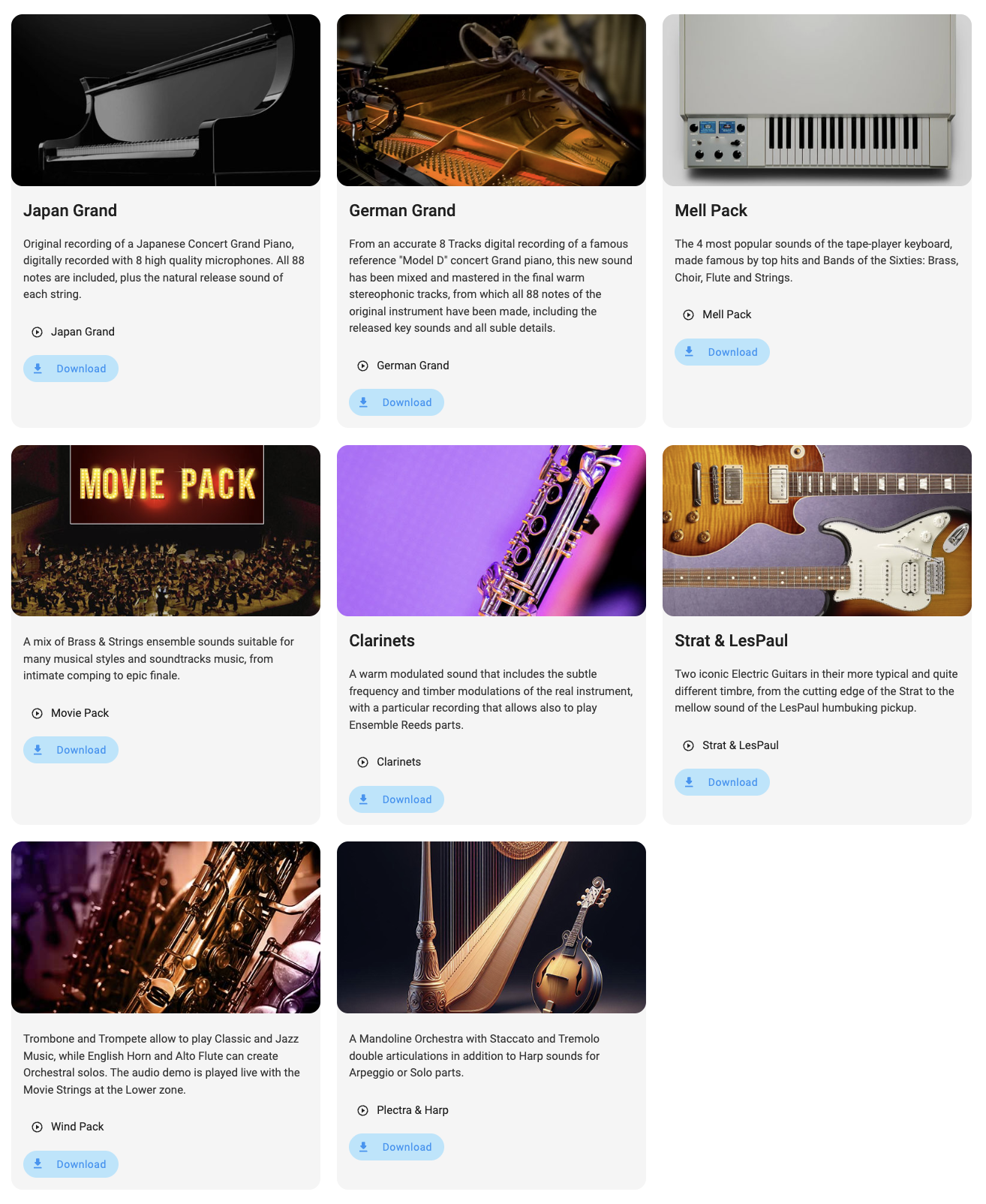
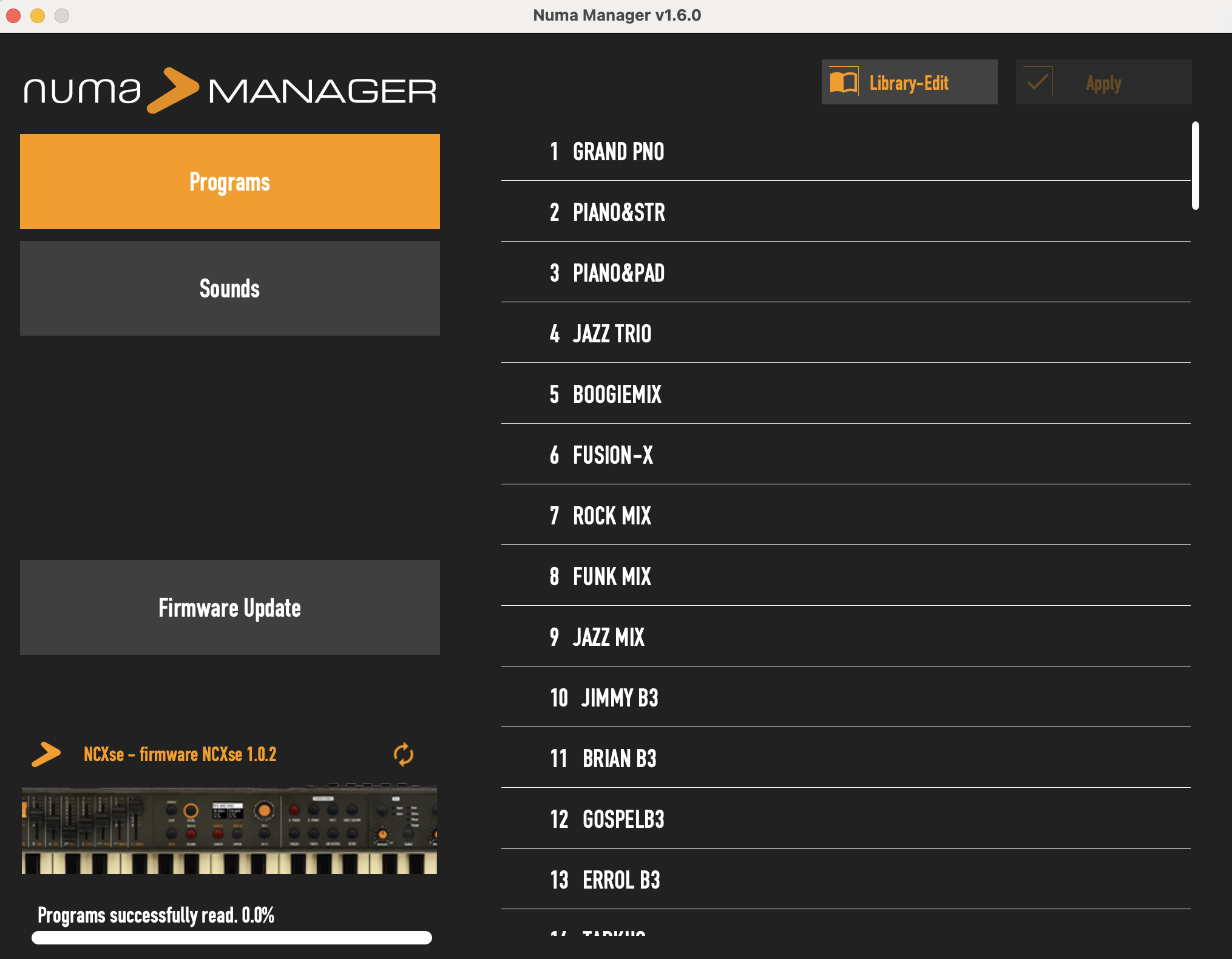
And if you download and install “Numa Manager” on your pc, you can download and install additional sample packs (for free) from Studiologic’s website (I downloaded the Japan & German grand pianos, the mell pack, strat & les pauls and the “wind” pack):
So how ARE the voices on these new models? I really wish I had a Compact 2X to compare the new model to directly; since I don’t, I’m going from memory only, but I have to say I’m REALLY impressed with the new sounds, in particular the acoustic pianos, and I’m pretty sure the hammond organ and rotary effects have indeed been improved as well. I’ll try to include as many bread and butter voices as I can in the upcoming demo, I’ll also spend some time demo’ing the new sound engine features for the acoustic pianos, electric pianos, and the synth engines, and I’ll definitely spend some time with the organ engine (including a quick comparison of the rotary overdrive which is available at the registration level with the generic distortion effect available on the front panel).
MIDI Connectivity
Effects
The Numa Compact SE and X SE have 2 banks of effects available (with 4 effects in each bank) that can be applied separately to the upper and lower voices. The FXA bank has Drive, Chorus, Phaser and Flanger; the FXB bank has Rotary, Tremolo, Pan Tremolo and Delay. As I mentioned in the user interface section, it’s SUPER easy to use these; for each section you just toggle between the upper and lower voice, and then toggle through the available effects (and you can choose NONE if you like) and then use the knob to adjust the amount of the effect.
So how do these knobs behave: when you select a new program/registration that happened to have an effect applied, the amount of the effect applied when you load that registration will match how it was saved, NOT the current position of the knob. As soon as you move the knob, then that will take over for editing the amount of the effect. If you add a NEW effect to a voice, it WILL use the current position of the knob (so the idea is, set up your voice with the effects and amounts you want, then save that in a registration). For example, program 9 has an electric piano in the upper voice with a phaser enabled in FXA; so if I turn the FXA knob to 0, THEN choose that registration, you’ll hear the phaser quite prominently even though the knob is at 0; but as soon as I touch the knob it comes into effect. If I was to move the FXA knob to the max and switch the effect to the flanger, you would hear that effect at full right away (because I just enabled it so it DOES use the knob’s current position). And then we also have a global reverb section where you can choose a reverb TYPE and then adjust the amount with that knob.
So as I mentioned earlier, I love how effects were implemented on the Numa Compact; I’m not someone who has any interest in deep diving into a menu to tinker with hundreds of effects and settings. Having just the bread and butter effects so easily available at the touch of a button is awesome.
Programs (Registration Memory)
Both the Numa Compact SE and X SE have 120 program slots available (which is up from 99 on the prior models) and there are 60 super handy built in programs with common voice settings and combinations. As with the rest of the user interface, the programs are really easy to use. Set up your voices, splits, layers, effects, any pedal or joystick settings the way you want them, then press STORE. Use the dial to move to the slot you want to use (the first 60 slots are the ones that came built in, slots starting at #61 will be named “User Init”). You can choose to overwrite one of the built in ones if you want, or you can save your program to one of the available slots; just press DOWN on the knob; you’ll be asked to confirm your action. Once you’ve saved your program, you can rename it by pressing EDIT when the program name is highlighted on the screen; that opens up the program or registration level settings.
So can you delete a program? Sort of; navigate to one of the empty “User Init” programs and then save that over top of the one you want to “delete” (you’re not REALLY “deleting” it, you’re just setting it back to a basic level). So this might give you the idea of doing this one program at a time to re-sort your programs (for example move program 12 to program 1 because you’d like to have program 12 loaded every time you turn on the piano. Well you CAN do that, BUT . . . there’s a MUCH easier way to do this, and that is by using the Numa Manager app on a pc or mac; you can grab the latest version of this from Studiologic’s website.
Numa Manager App
A full in depth demo of the Numa Manager app is beyond the scope of this review; I do intend on doing a deep dive video into it on my channel down the road, so stay tuned for that. But just so you know what you can do with this app:
- run firmware updates
- install new sounds downloaded from Studiologic’s website
- edit the order that sounds appear in when you press a sound category button
- edit the order of your programs; you can move any program or programs to any number you like – you can even select and move multiple programs at the same time
- my long term plan is (possibly) to move the first 59 voices to voices 62-120, leaving voice 61 as a blank “User Init”, and then start replacing programs 1-60 with my own (I may or may not bother “erasing” those first by copying “User Init” slots into them . . .)
- backup your program list to a file on your pc (which will be very important for me to do if I start messing around with my programs to this degree 🙂
Connectivity
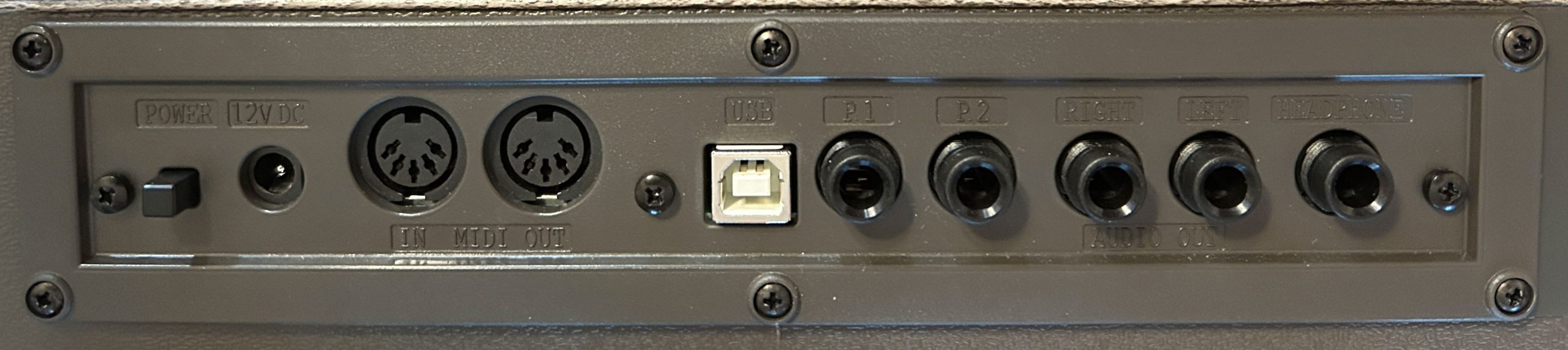
The Numa Compact SE & X SE have some awesome connectivity, but . . . I do have a couple complaints. All of the ports are on the back, and that leads me to my first complaint – the labels for these ports are REALLY HARD to read; the font physically raised, but it’s the same colour as the keyboard. My eyes aren’t great and I have to be very close to read these. Here’s what we have for connectivity:
- 1/4″ stereo headphone out
- two 1/4″ pedal ports (P1 is for an expression pedal and P2 is for a sustain/switch pedal)
- 5 pin MIDI in and MIDI out ports for connecting to other keyboards or hardware (which is super handy)
- the USB port includes an audio interface, which is always a feature I’m super glad to see in a keyboard; this connection not only sends MIDI to an app on a device, but it also sends audio in BOTH directions, which means you can:
- stream external audio in from a device to play along with
- send high quality digital audio DIRECT TO a device (to record an audio track in a DAW app, or to your phone to record a performance video)
- when sending MIDI to a VST app on a device, since the audio flows in BOTH directions, the sounds that app generates will come straight back to the Numa’s speakers, headphones and outputs without any lag
- AND, the USB port has another REALLY cool feature (that’s pretty rare in a stage keyboard), and that is: you can power the Numa Compact from a device connected to the USB port! That’s super cool (especially since the Numa doesn’t take batteries), but do note that the speakers will be automatically deactivated if you’re powering the keyboard with USB. And I have also noticed that MIDI functionality can become a bit flaky (at least powering the keyboard from my iPad; from my Macbook it was fine; just an FYI)
- 1/4″ left and right line out ports for connecting to external audio equipment like amps, PAs, mixers and audio interfaces; this is awesome for a gigging musician, BUT . . . here is my second complaint, and I have to admit this is the ONLY keyboard I have ever encountered this on (and it was the same on the prior models):
- on every keyboard I’ve ever seen that has L&R line out ports, if you only use the LEFT, you will get a mono signal that includes a sum of your left and right; this is by design, because if you are connecting to an amp that only has one port, you’ll want to hear both your L&R; and in many gigging environments (especially the small bars and clubs that I play in) you will quite often (almost all the time in my experience actually) only get ONE port on the mixer for the club
- on the Numa Compact, if you only use the LEFT, you ONLY GET THE LEFT; now depending on the voice sample, this may or may not be a big deal; I actually contacted Studiologic about this (and to their credit, they do respond within a couple of days), and their answer is the same as it was when I asked them about this issue on the prior model: “It’s by design, so that you don’t get phase cancellation; we recommend you use both L & R for the best result”; I don’t know a TON about phase cancellation, but the basic idea is if the LEFT sound wave & RIGHT sound wave happen to intersect, if they’ve been summed into one mono signal, you won’t hear anything. But that being said, the fact that EVERY OTHER manufacturer has always summed L&R when only the left is used leaves me wondering why Studiologic does this differently
- So my recommendation? If you can (of course) use both your L&R ports into external audio equipment and go stereo; if you can’t, then get some type of mixer or direct box that can sum the 2 signals for you and then send it to the house PA
Other Features
Portability
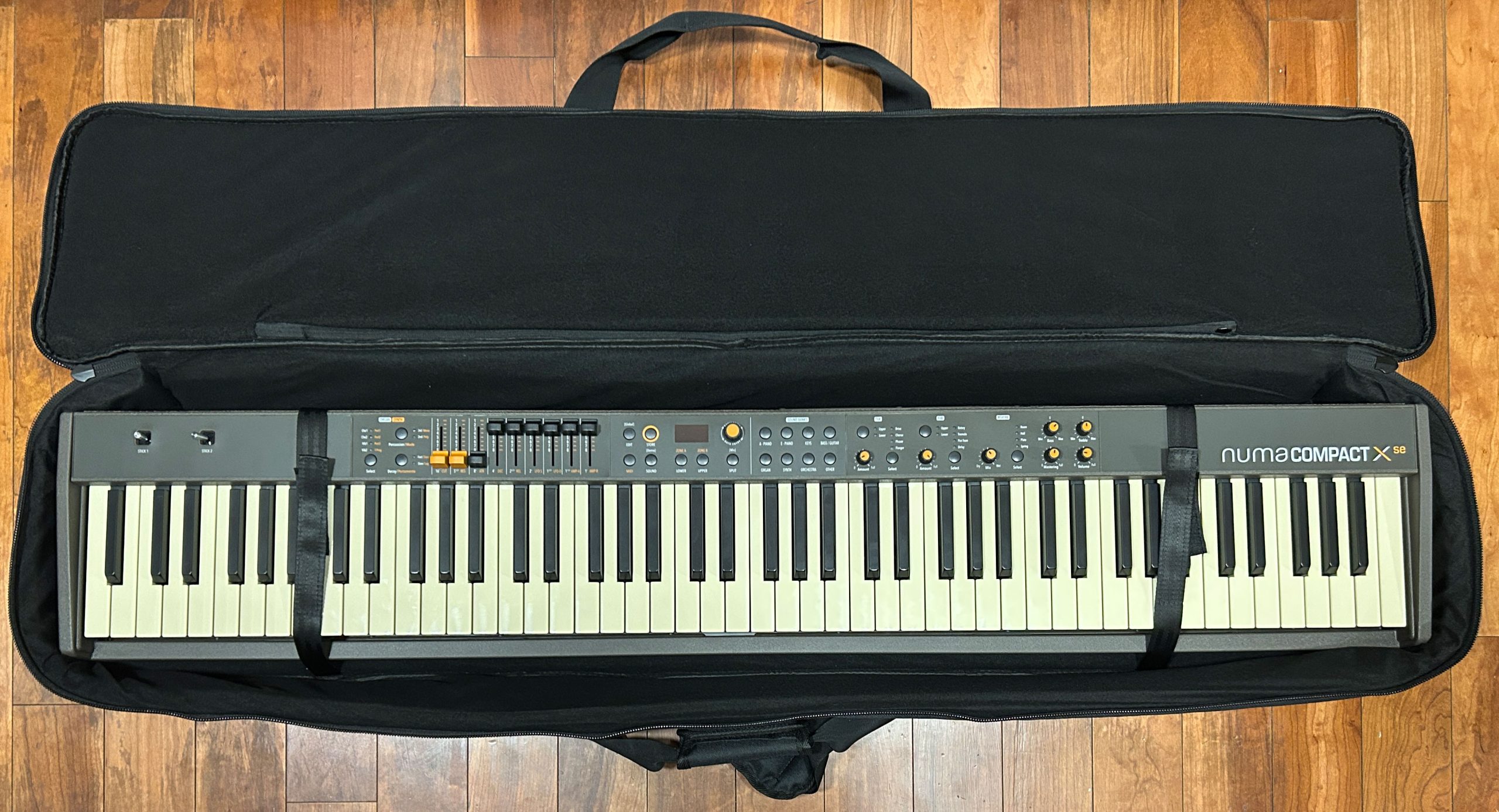
For an 88 key stage keyboard, the Numa Compact is INSANELY portable. It is super thin at only 4″, super narrow at a crazy 9″, and the width is about as small as it possibly be for a full-size 88 key keybed at only 50″. And the kicker here? It only weighs 15.6 pounds!!!
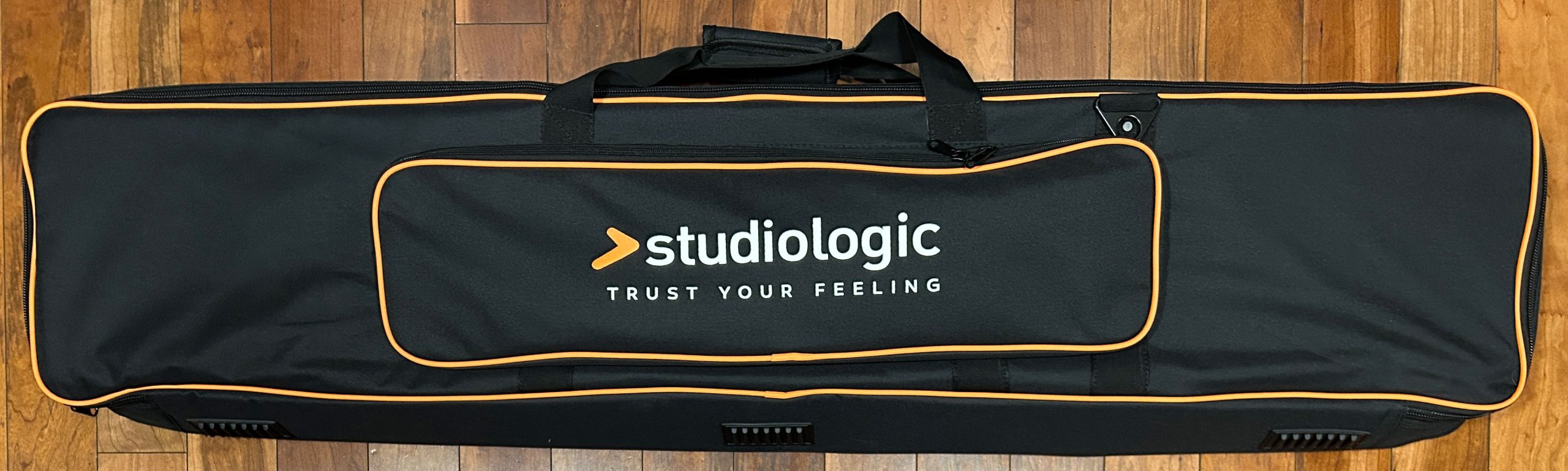
The Numa Compact is SO unusually . . . well . . . “compact” that if you’re planning on using yours for gigs or moving it around? I would HIGHLY recommend getting the custom bag; it’s well padded, well made, and fits the Numa perfectly; it’s totally worth the money. If you buy a generic bag, your Numa will be bouncing around inside it; there’s no way any generic bags will fit the Numa well. I’ll leave a link to check out current prices on the bag in the links section below.
Speakers
The speakers on both Numa Compact models are 10 watts per side for a total of 20 watts. The speakers are full range elliptical speakers, and they face out the back of the keyboard. That’s definitely NOT my preference, I ALWAYS prefer speakers that face the player as opposed to downward or backward facing speakers. 20 watt speakers facing the player would stand a much better chance of being usable as personal monitors (in a smaller, more intimate performance setting like a cafe), but with them facing backwards they’re pretty much only usable for personal practice, or a VERY quiet acoustic practice with others.
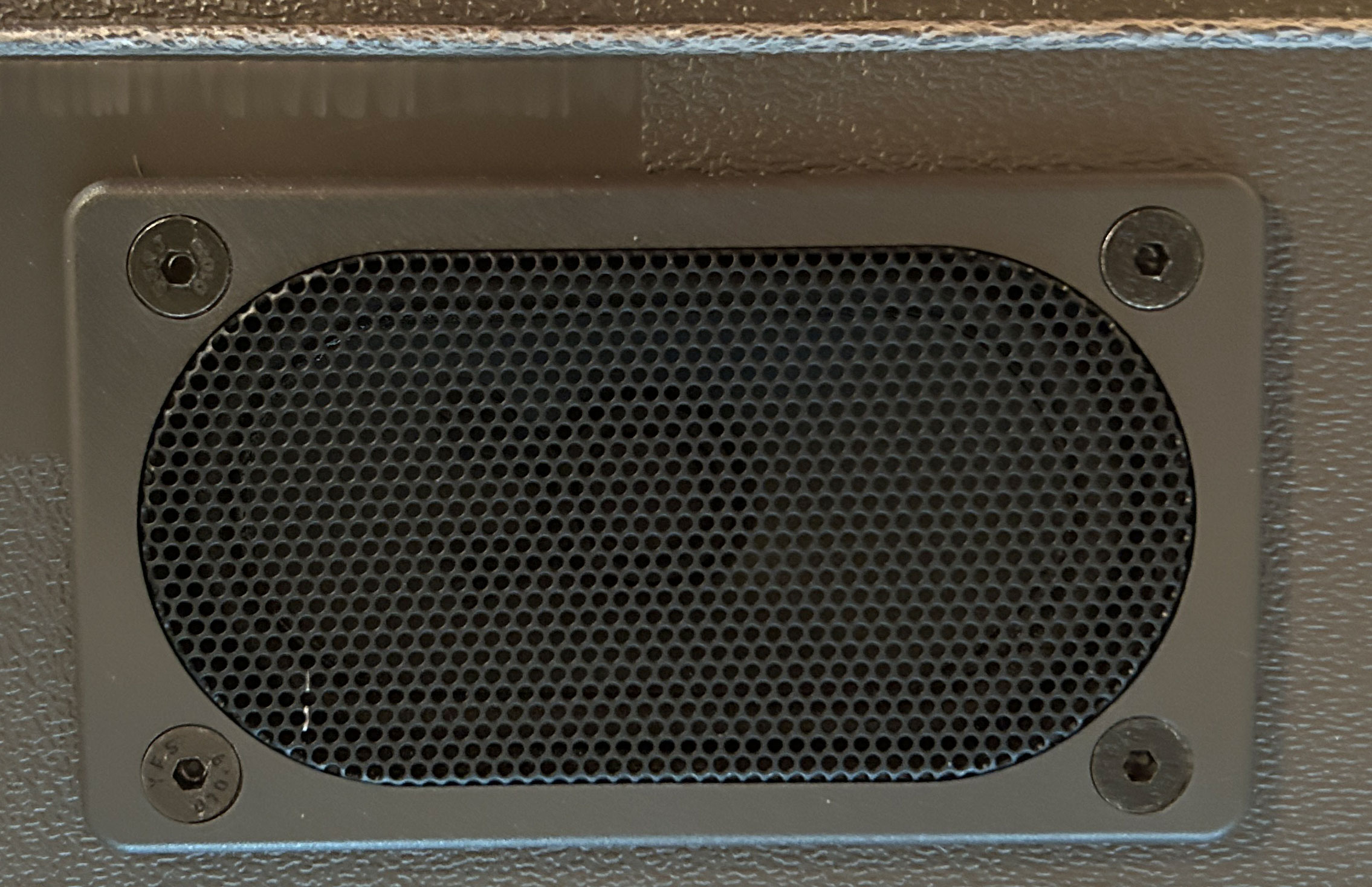
So for those uses, the speakers are fine (maybe a little bit on the tinny side). And to be honest, when playing gigs with my band at a pub with a PA system? I can’t even hear the 30 watt player facing speakers on my Yamaha PSR-SX720, so I’m starting to be of the opinion that speakers in stage keyboards aren’t super useful – they just add weight.
Here’s a quick demo of the Numa Compact X SE speakers just as picked up by the internal mic on my iPhone.
Any Negatives?
I have already mentioned some minor issues like there is no indicator light for the rotary, and the fact that using the left line out by itself doesn’t sum the left and right signals, but there is one bigger negative I do have to mention, and that has to do with build quality. The knobs and joysticks are fine, but the buttons do have a bit of a cheap plasticky feel to them, and the ports on the back all work just, but they just don’t feel to be super high quality to me. As far as the case itself; it is made of some really solid and stiff feeling plastic, but you can actually twist it a little bit from corner to corner if you try – in all fairness though. the super compact dimensions could also be contributing to that sensation.
Nord Electros and Yamaha YC series keyboards that have metal incorporated into the cases are built like absolute tanks in comparison, but they also cost two to three times as much. A Yamaha CK88 has a fully plastic case that feels much closer to the Numa (probably thinner plastic actually), but the controls and connections are still a bit higher quality feeling.
Now the build quality is not TERRIBLE by ANY means, and I have encountered much worse in my travels. My Numa Compact 2X felt exactly the same, and I moved it around multiple times a week to band practices and gigs for over a year, and had zero problems. And keep in mind that the Numa Compact is extremely inexpensive, so there are going to be some tradeoffs.
The Competition
Nord Electro, Yamaha YC, Viscount Legend One?
So I’m not going to bother going into a huge amount of detail comparing the Numa Compact X SE to each of the much higher priced all in one options like the Nord Electro, Yamaha YC-61 or Viscount Legend One. If you asked me would I rather take one of those to a gig or the Numa, I would of course opt for one of the “fancy” ones. But the main point to make here, is that while each of those are a bit more sturdy and have better sounds, more effects options etc? The difference between them and the Numa Compact might not be quite as big as you might think, especially with regard to the key action, where the Numa Compact’s Fatar action performs WAY above the keyboard’s pay grade.
The Nord Electro 73 key is well over $3000 USD, the Yamaha YC-73 and Viscount Legend One 73 are well over $2000 USD, and the Numa Compact X SE comes in at ONLY $1000!
(And the Numa Compact SE is only $700 USD)
And for that $1000 USD, you are still getting the same main sets of functionality: a stage keyboard with good sounds, organ & synth engines with realtime controls and good connectivity, and the key action on the Numa Compacts are actually VERY close to the key actions in these more expensive options.
So is the Numa Compact a Nord Electro? Obviously not . . . But is it close enough for a casual gigging musician like me who wants to save $2000 USD? In my opinion – yup!
So now I’ll get to some more specific comparisons with what I feel are the closest competitors to the Numa Compact; the Yamaha CK Series, which are closer in price.
Numa Compact X SE ($1000 USD) vs. Yamaha CK-61 ($1000 USD) or Yamaha CK-88 ($1500 USD)

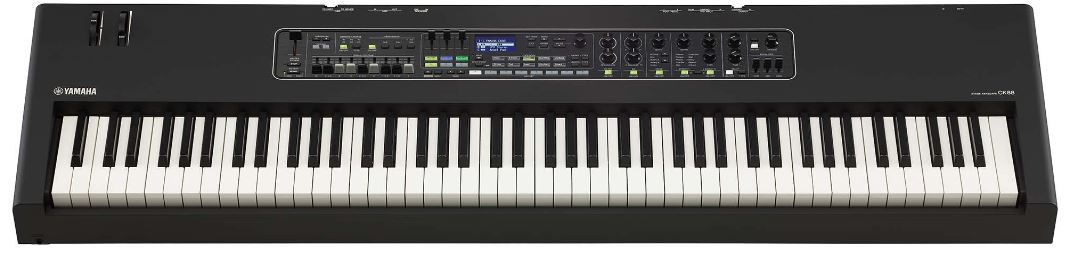
So I owned both the Yamaha CK-61 and the Yamaha CK-88, and did some gigs with the CK-88, and I LOVE those keyboards! They have the identical functionality, the only real difference are the keybeds. The CK-61 has 61 keys; it uses Yamaha’s FSB (“Future System Basic”) organ/synth style keys (the same as my Yamaha PSR-SX720) and this is a fantastic action. It’s not weighted, but has a subtle semi-weighted feel; it’s totally usable for piano, and pretty good for organ. The CK-88 has 88 fully weighted and graded hammer action keys, using one of my favorite key actions ever, Yamaha’s GHS.
So for key action, how does the Numa Compact X SE compare? It depends on your needs; for me, since I want an action that’s good for piano AND organ, the Numa Compact’s action is by far the best choice. It’s not as good for piano as the CK-88’s GHS action, but it’s better for piano than the CK-61’s FSB action. And while the CK-61’s action is pretty good for organ, the Numa Compact’s Fatar action is WAY better (it is actually very similar to Fatar TP/8O organ action). As far as the CK-88 goes for organ? Fully weighted keys just don’t work very well for that.
As far as sounds go, I would definitely give the edge to the CK Series over the prior Compact 2X model, but the SE and X SE have seen some improvements, so I’m going to hold off on that until I get a chance to rent a CK and do a shootout video. I’m curious about how the much improved pianos compare, but even more curious about the hammond organs and rotary simulation. But suffice it to say, sounds on both of these options are really good and totally usable.
The CK series keyboards do outperform the Numa in a number of areas, such as having 3 layers with easy relative volume controls vs. 2 layers, and a far bigger effects section; the build quality is a touch higher on the Yamahas, and the resale value with Yamaha WILL DEFINITELY be better (at least in North America, where Studiologic is not as well known as in Europe). But the Numa Compact X SE has those 2 MIDI zones you can layer in with onboard sounds, AND while I didn’t use the synth voices on the CK series when I owned them, I’m pretty sure the Numa Compact X SE’s synth engine outshines the CK series with all of the live control options available with the drawbars for shaping your sound wave.
So how does this comparison shape up? To be honest, if you want a stage keyboard for piano AND organ (or one that is MOSTLY for organ), I would recommend the Numa Compact X SE. If organ is an afterthought and you’re mostly after a stage PIANO, then the CK-88 is the best option, but keep in mind: the Numa Compact SE at only $700 USD would still work really well for you at less than half the price.
Numa Compact 2/2X vs. Numa Compact SE/X SE

What about the prior versions? To be honest I can’t compare them head to head, so this is mostly from memory – but I’m REALLY confident that there have been some significant improvements in sound quality since the prior models, and they’ve retained that awesome Fatar key action, so unless you can find a used 2 or 2X for a REALLY good deal, I think it’s worth it to stick with the new models.
Numa Compact X SE / SE: The Verdict
The verdict is easy on these stage keyboards is easy – AWESOME!
The Numa Compact SE and X SE are some of the
best value stage keyboards on the market!
For only $700 USD for the Numa Compact SE you’re getting a stage keyboard with:
- 4 actual sound engines; good quality piano & electric piano sounds
- an actual organ engine & onboard rotary simulator
- an actual synth engine
- a great hybrid key action from Fatar that will get you through both piano AND organ playing
- simple, intuitive and super functional user interface
- great multi-zone MIDI functionality
- bread and butter effects
- good connectivity
- only 15.6 pounds!
And for only an extra $300 USD, the Numa Compact X SE adds physical controls such as buttons and drawbars/sliders for realtime adjustments to your organ and synth engine voices.
I can HIGHLY recommend the
Numa Compact SE & X SE!
Thanks so much, and happy keyboard playing! (and keyboard shopping 😉 )
Check out current pricing in your area:
Numa Compact 2/2X/SE/XSE Gig Bag
Piano Training I Recommend
I’ve taken a number of online piano courses and tried various piano learning apps; the ones I’m listing here are my favorites and I can highly recommend any of these if you are looking for some online training to get started on learning piano, or to take your current skills to the next level.

Bird’s Piano Academy is one of my absolute favorite online piano programs. Arthur Bird has created multiple courses on getting started learning piano quickly as well as great intro courses on Blues, Jazz and more. And his courses are chord based, so you don’t have to read sheet music which is AWESOME and definitely the fastest way to learn to play modern music. You can go with a subscription that includes ALL his courses, or you can buy individual courses a la carte with LIFETIME access – HIGHLY RECOMMENDED!
If you’re looking for the least expensive way to get started on piano, Pianoforall is a great option. It’s a unique course created by Robin Hall that uses downloadable eBooks with embedded videos and audio instead of a website.
This course is an amazing option for learning piano from beginner up to being able to perform; it teaches multiple genres of music and focuses on how to be a “one person band” on the piano. This course is taught by pro pianist Steve Lungrin – Steve has been teaching and performing his whole adult life and is a fantastic instructor and performer.
I took this course from 2020 to 2021 and it elevated my playing from a very basic level to being able to play songs in multiple genres.
I was super excited when Simply Piano added the “Chords Path” to their super popular piano training app (iOS or Android); this path allows a new student to get started learning piano using a chords based approach (which I HIGHLY recommend over a traditional approach). Learning to play using chords is by far the easiest and fastest way to learn to play modern songs (MINIMAL sightreading ability is needed). I did the entire chords path, and can highly recommend that you check it out (you will get a trial period so why not?)

This is a fantastic option if you are mostly interested in rock music. This course was created and is taught by Marine Lacoste, who is not only a fantastic instructor & pianist, but she is also a very accomplished hammond organ player – she performs regularly with her own band, as well as playing keys regularly for multiple recording artists on tour. I started this course in 2023 when I joined a band, and it is helping me greatly in taking my playing to a new level. And Marine is constantly adding new content, and is very active on the platform.
If you sign up for Online Rock Lessons yearly subscription, use code PIANOTONE at checkout to let Marine know I referred you, and she will give you some free bonuses!

This is a fantastic (but pretty unique) online program for taking your piano and organ playing skills to the next level, developed by pro piano, keyboard & Hammond organ player Mike Little. Mike shares tips & tricks accumulated from over 30 years of pro touring, gigging, studio & production experiences. This course isn’t for a COMPLETE beginner, but you don’t have to be a super accomplished player either, to get TONS of value from this program!

Ultimate Piano isn’t an actual course to learn how to play, but it IS a really helpful TOOL for piano students. You connect your keyboard to your computer, go to Ultimate Piano’s website (so NOTHING to install!) and you have a ton of helpful training and exercises at your disposal, as well as built in piano sounds. With the help of on screen light up keys, you can learn and practice scales, chords and even ear training and you can play along with MIDI or audio files, and even YouTube videos to practice songs!