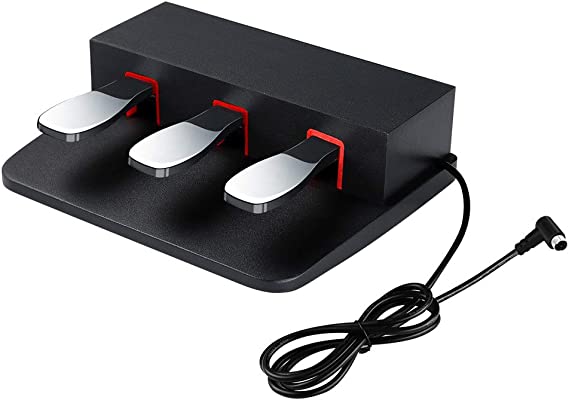
This is my review on the DAOK portable triple pedal unit that’s available on Amazon. Now do be careful when you’re looking at these on Amazon, because while MOST of them DO appear to be the version that IS compatible with Yamaha digital pianos like the P-515, the DGX-670, the P-125 or the new P-225 as a portable alternative to Yamaha’s LP-1 triple pedal unit (that requires buying a Yamaha stand):
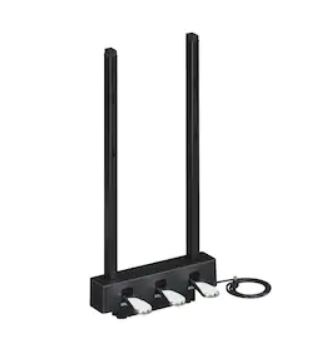
there ARE other versions of this pedal that say they are compatible with Kawaii pianos (and I have no idea if these are the same pedals or not), and there are also versions that have a ¼” TR connector instead of the Yamaha triple pedal port style connector. So the one I bought and am reviewing in this review IS the one that is meant for Yamaha digital pianos, so it has the same type of connector as Yamaha’s LP-1 triple pedal.
Testing The DAOK With My DGX-670
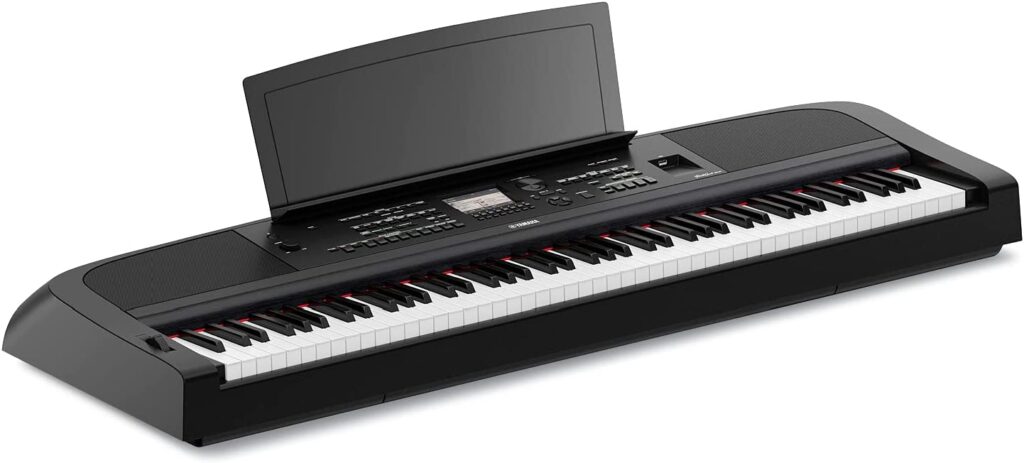
I tested the DAOK triple pedal unit with my Yamaha DGX-670 digital piano, and . . . it works really well (but there is some strange behaviour I will get to in a bit – but that behaviour is not a big issue in my opinion). The DAOK is very comfortable to play, and doesn’t slide around at ALL on my hardwood floor (like EVERY OTHER portable pedal I have ever used does). On the DGX-670, you can choose from a list of 50 functions that EACH pedal can do, and since you can connect a generic pedal (like my M-Audio SP2 pedal) to the auxiliary port at the same time as having a triple pedal connected to to the triple pedal port, you have up to 4 pedal functions you can have active at once. What each pedal does by default will change depending on the voice you have selected.
As you would expect, for piano voices, the following pedal assignments are the default:
- Right pedal (damper/sustain)
- Middle pedal (sostenudo)
- Left pedal (soft)
- Aux pedal (the other port-also damper/sustain)
All of these 3 functions work perfectly, and good news: the right pedal DOES support half pedaling! I demo the piano pedal functions in this video:
So What’s The “Strange” Behaviour?
I should mention that this behaviour MAY not be the DAOK triple pedal, and may instead be an issue with how the DGX works with ANY triple pedal unit (including the Yamaha LP-1); but it is PROBABLY just an issue with the DAOK. But that being said, I don’t think this is a huge issue (it definitely is NOT an issue for me; I just wanted to let you all know about it).
With the right pedal only, it seems that if you start editing what you want the right pedal to do, it will do that . . . BUT it will ALSO do whatever it was last set to do, or what it was set to do by default. For example, if I switch the right pedal from sustain to starting and stopping the rhythm style and then press the pedal: it does start and stop the style, BUT it ALSO will sustain notes. I do an in-depth demo of this in the main video version of this review (and that video really isn’t very long, so if you want to see what I mean, just follow the link to the YouTube review at the bottom of this page).
So why do I think this isn’t a big deal?
- I never tend to change what the right pedal does (from the default) for any voice I use
- For any pedal customization I DO use (and I have more than a few of those), I typically start with the auxiliary pedal, and then the left, and then if needed . . . the middle (but never the right)
DAOK Triple Pedal – THE VERDICT
HIGHLY RECOMMENDED!
I really like this pedal! I actually owned a Yamaha LP-1 triple pedal unit and returned it after a month or so, because I found the pedals to be too stiff to press, and a bit high off the ground for my taste. The DAOK pedal is super comfortable to play, it doesn’t slide around on my hardwood floor at ALL, and all of the functions work great (including half-pedaling!), it doesn’t REQUIRE buying a wooden Yamaha stand, and . . . it is super portable! And as I mentioned earlier, that strange behaviour when customizing the right pedal is a complete non-issue (for me).
Alternatives
The only alternative I am aware of is the Yamaha LP-1 pedal which requires the wooden stand from Yamaha. You might like this pedal more than I, but as I mentioned I returned mine because the pedals were too stiff.
Check Prices Online
I have included links below so that you can check current pricing – please note that as an affiliate I may earn from qualifying purchases
Video Version Of This Review:
Piano Training I Recommend
I’ve taken a number of online piano courses and tried various piano learning apps; the ones I’m listing here are my favorites and I can highly recommend any of these if you are looking for some online training to get started on learning piano, or to take your current skills to the next level.
Bird’s Piano Academy is one of my absolute favorite online piano programs. Arthur Bird has created multiple courses on getting started learning piano quickly as well as great intro courses on Blues, Jazz and more. And his courses are chord based, so you don’t have to read sheet music which is AWESOME and definitely the fastest way to learn to play modern music. You can go with a subscription that includes ALL his courses, or you can buy individual courses a la carte with LIFETIME access – HIGHLY RECOMMENDED!
If you’re looking for the least expensive way to get started on piano, Pianoforall is a great option. It’s a unique course created by Robin Hall that uses downloadable eBooks with embedded videos and audio instead of a website.
This course is an amazing option for learning piano from beginner up to being able to perform; it teaches multiple genres of music and focuses on how to be a “one person band” on the piano. This course is taught by pro pianist Steve Lungrin – Steve has been teaching and performing his whole adult life and is a fantastic instructor and performer.
I took this course from 2020 to 2021 and it elevated my playing from a very basic level to being able to play songs in multiple genres.
I was super excited when Simply Piano added the “Chords Path” to their super popular piano training app (iOS or Android); this path allows a new student to get started learning piano using a chords based approach (which I HIGHLY recommend over a traditional approach). Learning to play using chords is by far the easiest and fastest way to learn to play modern songs (MINIMAL sightreading ability is needed). I did the entire chords path, and can highly recommend that you check it out (you will get a trial period so why not?)
This is a fantastic option if you are mostly interested in rock music. This course was created and is taught by Marine Lacoste, who is not only a fantastic instructor & pianist, but she is also a very accomplished hammond organ player – she performs regularly with her own band, as well as playing keys regularly for multiple recording artists on tour. I started this course in 2023 when I joined a band, and it is helping me greatly in taking my playing to a new level. And Marine is constantly adding new content, and is very active on the platform.
If you sign up for Online Rock Lessons yearly subscription, use code PIANOTONE at checkout to let Marine know I referred you, and she will give you some free bonuses!

This is a fantastic (but pretty unique) online program for taking your piano and organ playing skills to the next level, developed by pro piano, keyboard & Hammond organ player Mike Little. Mike shares tips & tricks accumulated from over 30 years of pro touring, gigging, studio & production experiences. This course isn’t for a COMPLETE beginner, but you don’t have to be a super accomplished player either, to get TONS of value from this program!
Ultimate Piano isn’t an actual course to learn how to play, but it IS a really helpful TOOL for piano students. You connect your keyboard to your computer, go to Ultimate Piano’s website (so NOTHING to install!) and you have a ton of helpful training and exercises at your disposal, as well as built in piano sounds. With the help of on screen light up keys, you can learn and practice scales, chords and even ear training and you can play along with MIDI or audio files, and even YouTube videos to practice songs!