Hi there! This is my (long overdue) review on my Yamaha Reface YC organ. The Reface series is a super cool line of keyboards from Yamaha with 37 mini keys (that are SUPRISINGLY playable). Now these were first released a LONG time ago (2015), but they are still being sold, and they are STILL VERY relevant and very useful. So . . . let’s check it out!
What Is The Reface Line?
So the SUPER cool thing about the Yamaha Reface line is the sound samples and engines in these are REALLY high quality; they’re comparable with full size keyboards that are FAR more expensive. And if you go into a store to test one of these out, make sure you test them with either your headphones or test them using an amp – the speakers are great for such a tiny keyboard, BUT THE SPEAKERS DO NOT GIVE YOU AN ACCURATE PICTURE OF HOW GOOD THE SOUNDS REALLY ARE!
So even though the Reface keyboards might SEEM expensive because they have mini keys yet currently sell for about $400-$450 USD, they’re actually a great value. So how does Yamaha keep the price down on these (other than the obvious fact that they’re physically small)? By making each model TOTALLY specific to a certain type of keyboard; so this allows Yamaha to limit each one to only a small bank of sound samples or specific tone engines. And a nice side effect of THAT is the physical controls on the keyboard can also be 100% tailored towards that type of keyboard, which is awesome.
So the model I’m reviewing is the YC which is the organ model. There are also:
- Reface DX: FM Synthesizer
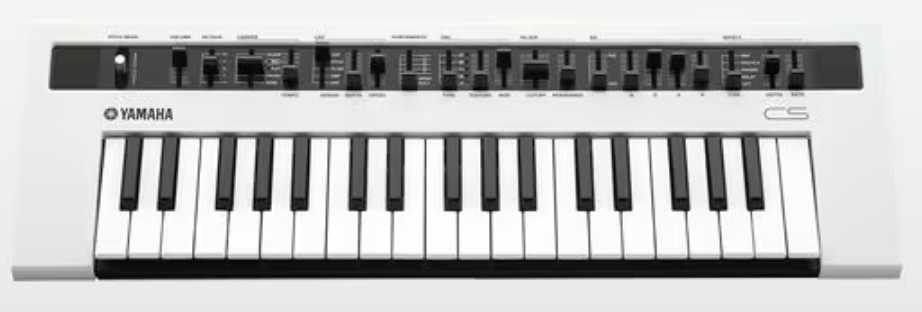
- Reface CS: Analog Synthesizer
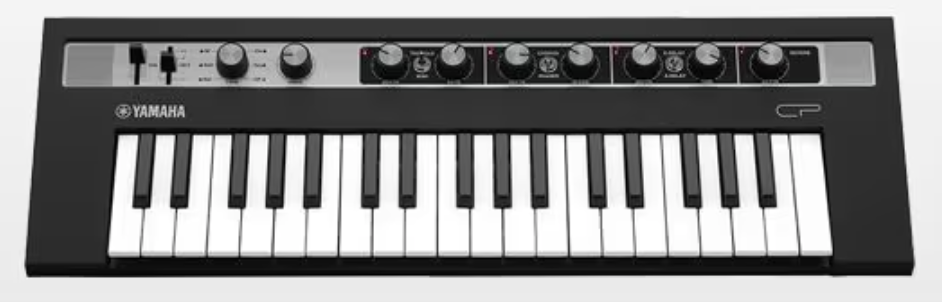
- Reface CP: Electric Pianos

Yamaha Reface YC
Key Action
So I thought I would start this review by talking about the key action, because your first thought might be “what about these mini keys; why would I pay $400 USD for a mini key keyboard?” Well first of all, the 37 mini keys on the Reface are SURPRISINGLY nice to play; they feel really well built, solid, smooth and responsive. These keys are FAR nicer to play than ANY mini key MIDI controller that I have ever played.
But the other important thing to note here (which I will talk about more in the connectivity section) is that the Reface keyboards have MIDI in and out ports, so you can take advantage of the high quality sounds on your Reface using a MIDI controller or other keyboard with a full size keybed & key action that you like that also has 5 pin MIDI ports. So for example, even though my Yamaha PSR-SX720 has some DECENT organ functionality, I can get FAR better organ sounds by connecting my PSR’S MIDI out port to the Reface’s MIDI in, and take advantage of the awesome keybed on the PSR to trigger the Reface’s sounds. Now the connectivity on the Reface is actually fantastic, but I’ll get to that in a bit; let’s check out the user interface and sounds first.
User Interface
So as I mentioned in the intro, since each Reface keyboard is specific to a type of keyboard, that allows Yamaha to only include relevant physical controls for that type of keyboard (instead of what we usually see on keyboards with multiple types of keyboard sounds, where the manufacturer tries to cram in as many physical controls as possible for ALL keyboard types). And the result is a REALLY cool, totally custom tailored set of physical controls.

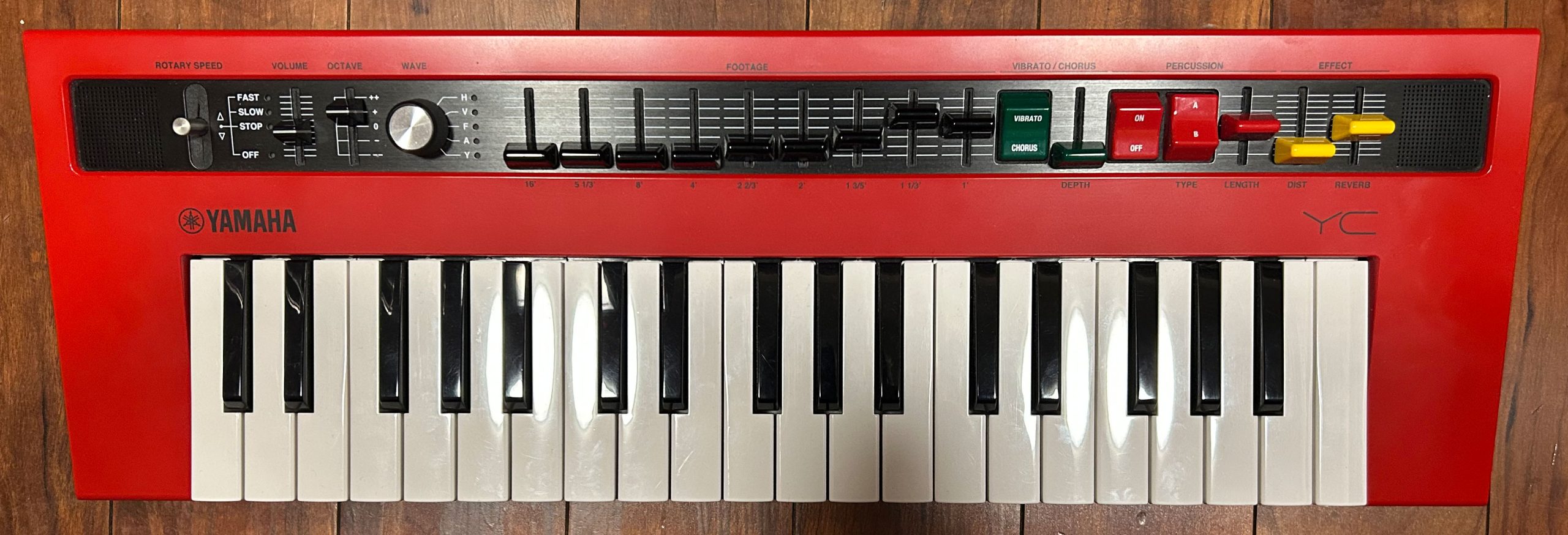
So on the left side we have a nicely “flickable” rotary speaker joystick; you can set the rotary to be fast, slow, stopped, or off altogether if you just want to bypass it. Then we have a volume slider, and then a super handy (since there are only 37 keys) octave slider where you can quickly move the octave up or down by 2 in either direction; and also cool – if you are holding down a key when you move the octave, any keys being held down stay in the octave they’re at – the octave adjustment will only affect newly pressed keys.
Then we have 9 organ drawbars with their footages labelled below, so you can modify your organ sound on the fly; and a REALLY nice touch by Yamaha here; even though these drawbars are small, they actually have notches for each setting so it’s easy for you to feel a click with each adjustment as you make it. Then we have a green vibrato/chorus rocker switch where you can choose to add either vibrato or chorus and adjust the depth with a slider control. Note that you can only have one of vibrato or chorus active at a time.
Then we have the percussion section; if you’re not familiar with percussion on an organ, it adds a distinct sound when a key is first pressed. You can turn percussion on or off with the rocker switch, and choose between two types of percussion sound with the “A/B” rocker switch, and then choose how long the percussion sound takes to decay with the Length slider. Then to the right of that we have a couple of nice and simple yet super handy effects we can use on any of the voices; a distortion slider and a reverb slider.
So this user interface is really nice – all the main usual organ controls for modifying your sound on the fly are right at your fingertips, just like on a real organ. The percussion and vibrato/chorus controls aren’t implemented the same as you would usually see on an organ, but they’re there and still easy to use. So like I said in the intro, that’s one of the things that makes the Reface line so cool; they’re all so specific to a certain type of keyboard, that the user interface can be 100% focused on JUST the controls that are relevant.
Sounds
OK for sounds, the Reface YC uses Yamaha’s AWM (Organ Flutes) organ engine. Note that Yamaha’s entry level stage pianos, the CK series, also use the AWM (Organ Flutes) engine. So the Reface has 5 organ types built in:
- “H”: American tonewheel organ (Hammond)
- “V”: English transistor organ (Vox Continental)
- “F”: Italian transistor organ (Farfisa)
- “A”: Japanese transistor organ (Ace Tone)
- “Y”: Yamaha YC45 organ
So in the following sound demo, I’ll demo the drawbars, rotary, octave slider, vibrato & chorus, percussion and the effects using the keys on the Reface itself; then I’ll demo some playing using the keybed on my Yamaha PSR-SX720 which will be connected to the Reface via MIDI (but the sounds you’re hearing ARE from the Reface not the PSR-SX.
Connectivity
Ok so as I mentioned, the connectivity on the Reface line is really impressive (and is another reason these “mini powerhouses” sell for around $400USD).

So starting from the left we have:
- the power supply port (do note you can also run the Reface on 6xAA batteries)
- power switch
- Foot Controller port: this is for an expression pedal to control volume swells (I do wish the Reface also had a switch pedal port to control the rotary speed, but . . . you can’t have everything)
- 1/4″ L&R line out ports for connecting to external audio equipment like PAs, mixers, amps and audio interfaces (I’m using those ports connected to my UA Volt audio interface for this video); given how awesome the sounds are on the Reface, I’m glad Yamaha included these ports so that gigging musicians can easily use their Reface live
- 1/4″ stereo headphone port
- 1/8″ auxiliary audio in port for connecting a device to stream in external audio
- MIDI port:
- this is one of the most important ports ON the Reface given the mini-keys; it allows you to connect an external keyboard or MIDI controller that you can use to trigger the sounds on the Reface
- Minor Complaint:
- Instead of just including standard 5 pin MIDI in and out ports, Yamaha chose to use a “Mini-DIN” MIDI port which requires a breakout cable (which IS included with the keyboard) to provide the proper 5 pin MIDI in and out ports; it’s not the end of the world or anything, but does mean you have this extra little cable you always have to carry around, and if you lost that then you would have to replace it, and while you CAN do that, it may not be super easy because these aren’t super common, so I REALLY wish Yamaha had just put in proper MIDI ports
- USB to host port:
- and then finally we have the usual USB to host port (USB-B) for connecting the Reface to a device to transmit MIDI over USB (do note that unlike alot of Yamaha keyboards, this port does NOT transmit audio, only MIDI which is a bit of a shame
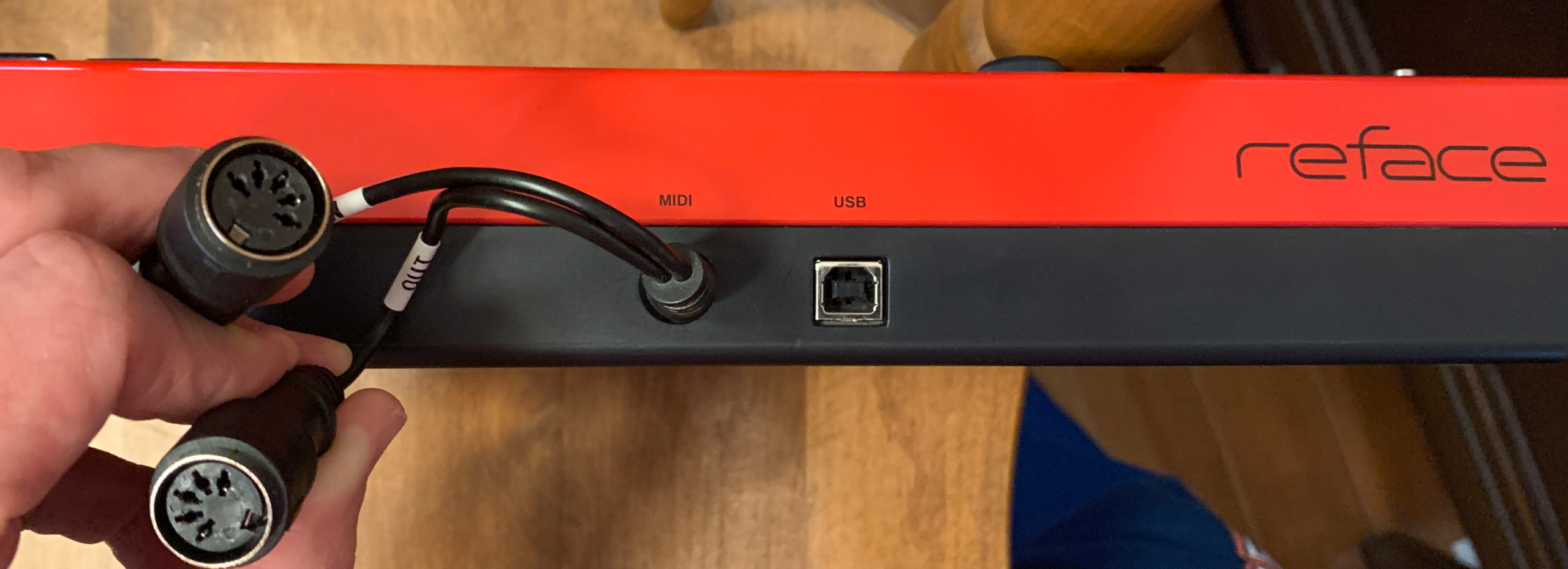
So overall the connectivity is really good; given that the Reface definitely has stage worthy sounds, it’s AWESOME that Yamaha didn’t totally cheap out; they included proper L&R line outs to properly connect to external audio equipment like a mixer or PA, AND they included MIDI in and out ports to connect to other hardware, most likely another keyboard so you can use that keyboard’s full size keys to trigger the sounds on the Reface.
Speakers
So for speakers on a keyboard this tiny, you shouldn’t expect much; but to be honest they actually sound pretty good for the size. They’re only 2 watts each for a total of 4 watts, and measure 3cm x 2cm each. They obviously don’t get very loud, but they do sound good, they don’t distort at max volume, and they’re totally fine for home practice. Here’s a quick video of the speakers (at max volume) just as picked up by the internal mic on my iPhone:
What’s Missing?
In my opinion, the Reface YC is close to perfect, but it IS missing 3 things:
- A second pedal port so that you could switch the rotary speaker speed with a foot switch; the joystick is pretty handy and easy to use, but having the option to also use a pedal would be really helpful
- 5 pin MIDI in and out ports (instead of the MINI-DIN port with the breakout cable); the actual ports would be way sturdier and then you don’t have to worry about losing your breakout cable – and: “Hey Yamaha: if you DID include proper MIDI ports, you’re adding the cost of one more port but then you DON’T have to incur the cost of the breakout cable . . .”
- And the third is the lack of an audio interface built into the USB port; on a keyboard like this, it’s probably NOT as big a deal as it would be on less “specific use” boards, but it would still add a ton of useful functionality, and the fact that Yamaha has been including this feature in almost all of their keyboards and digital pianos in the last few years (even the $200USD Yamaha PSR-E383) leaves a bit confused as to why it was left out
So if Yamaha added those 3 things, I think I would feel ok calling the Reface YC “perfect”; actually even if they added the first 2 I would 🙂 But either way, the Reface YC comes pretty darn close as is.
The Competition / Alternatives
So the Reface YC doesn’t REALLY have any direct competitors in my opinion; there is the Hammond M-Solo 49 key organ that I reviewed, but you can’t REALLY compare that directly to the Reface even though it is also a smaller sized organ specific keyboard, mostly because the M-Solo has 49 full sized keys, so that (and the fact that it sells for almost 3x as much as the Reface) pretty much rules that out. As far as someone like me who would like to use either of those keyboards live, the M-Solo is totally playable standalone, whereas MOST players would probably prefer to use a MIDI controller or keyboard with full sized keys to trigger sounds on the Reface.

The Verdict
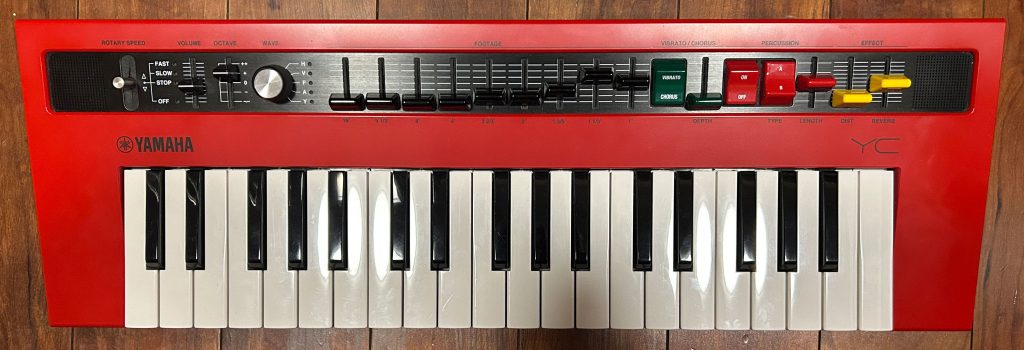
I REALLY like the Yamaha Reface YC; great quality organ sounds with all the physical organ controls you would expect, expression pedal input for a volume swell pedal, and with a MIDI in port & L&R line outs, the Reface is TOTALLY usable at a gig – just connect your full size key MIDI controller or keyboard to it, and you can add some great organ functionality to your rig at only FOUR pounds!!!
I Highly Recommend The
Yamaha Reface YC!
So if you want to check out current prices in your area for the Yamaha Reface YC or any of the other accessories or products I talk about in this review, please check out my affiliate links below.
Thanks so much, and happy organ playing! (and organ shopping 😉 )
I have included links below so that you can check current pricing – please note that as an Amazon Associate I earn from qualifying purchases
Video Version Of This Review
Piano Training I Recommend
I’ve taken a number of online piano courses and tried various piano learning apps; the ones I’m listing here are my favorites and I can highly recommend any of these if you are looking for some online training to get started on learning piano, or to take your current skills to the next level.
Bird’s Piano Academy is one of my absolute favorite online piano programs. Arthur Bird has created multiple courses on getting started learning piano quickly as well as great intro courses on Blues, Jazz and more. And his courses are chord based, so you don’t have to read sheet music which is AWESOME and definitely the fastest way to learn to play modern music. You can go with a subscription that includes ALL his courses, or you can buy individual courses a la carte with LIFETIME access – HIGHLY RECOMMENDED!
If you’re looking for the least expensive way to get started on piano, Pianoforall is a great option. It’s a unique course created by Robin Hall that uses downloadable eBooks with embedded videos and audio instead of a website.
This course is an amazing option for learning piano from beginner up to being able to perform; it teaches multiple genres of music and focuses on how to be a “one person band” on the piano. This course is taught by pro pianist Steve Lungrin – Steve has been teaching and performing his whole adult life and is a fantastic instructor and performer.
I took this course from 2020 to 2021 and it elevated my playing from a very basic level to being able to play songs in multiple genres.
I was super excited when Simply Piano added the “Chords Path” to their super popular piano training app (iOS or Android); this path allows a new student to get started learning piano using a chords based approach (which I HIGHLY recommend over a traditional approach). Learning to play using chords is by far the easiest and fastest way to learn to play modern songs (MINIMAL sightreading ability is needed). I did the entire chords path, and can highly recommend that you check it out (you will get a trial period so why not?)

This is a fantastic option if you are mostly interested in rock music. This course was created and is taught by Marine Lacoste, who is not only a fantastic instructor & pianist, but she is also a very accomplished hammond organ player – she performs regularly with her own band, as well as playing keys regularly for multiple recording artists on tour. I started this course in 2023 when I joined a band, and it is helping me greatly in taking my playing to a new level. And Marine is constantly adding new content, and is very active on the platform.
If you sign up for Online Rock Lessons yearly subscription, use code PIANOTONE at checkout to let Marine know I referred you, and she will give you some free bonuses!

This is a fantastic (but pretty unique) online program for taking your piano and organ playing skills to the next level, developed by pro piano, keyboard & Hammond organ player Mike Little. Mike shares tips & tricks accumulated from over 30 years of pro touring, gigging, studio & production experiences. This course isn’t for a COMPLETE beginner, but you don’t have to be a super accomplished player either, to get TONS of value from this program!

Ultimate Piano isn’t an actual course to learn how to play, but it IS a really helpful TOOL for piano students. You connect your keyboard to your computer, go to Ultimate Piano’s website (so NOTHING to install!) and you have a ton of helpful training and exercises at your disposal, as well as built in piano sounds. With the help of on screen light up keys, you can learn and practice scales, chords and even ear training and you can play along with MIDI or audio files, and even YouTube videos to practice songs!